
Participating Frequently
March 4, 2022
Question

"Frame substitution" Error and black footage after rendering

  • March 4, 2022
  • 2 replies
  • 3959 views

Hello everyone,

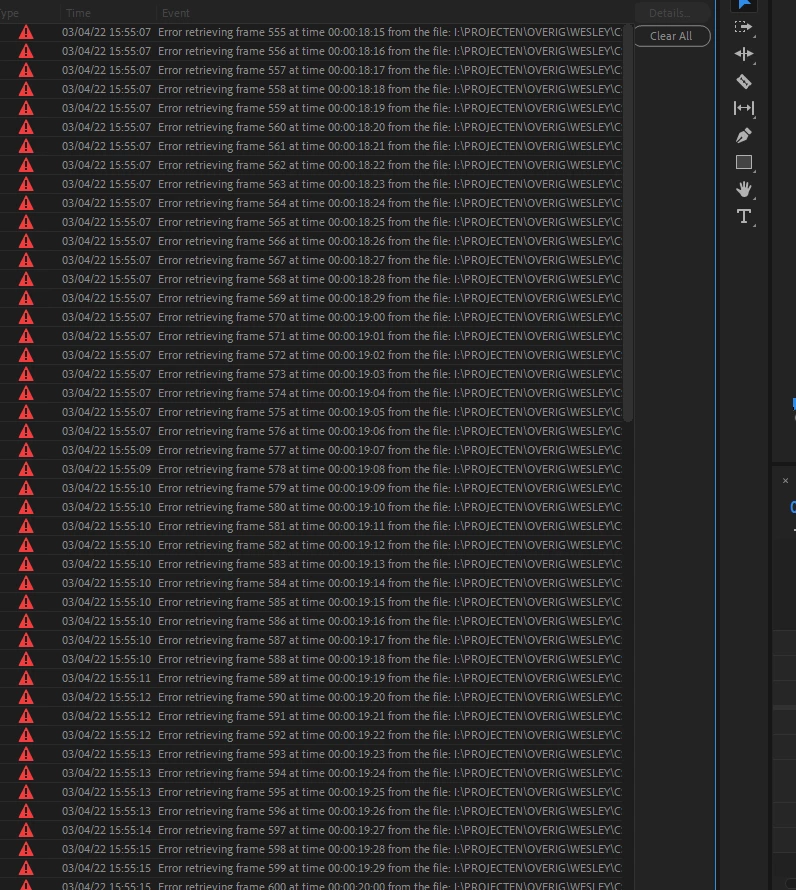
I have been struggling with an issue that I get very frustrated with because it hinders me from working any further. After I render my footage, I get a bunch of errors that say "error frame substitution recursion attempt" and half of my video turns all black. The audio is untouched, but the video is nothing but black. Does anyone know the reason behind this and how to fix this? You would help me out a ton!
2 replies

Participating Frequently
March 8, 2022

Hey @Jan de Laat ,


There are many people having this issue with no clear cause of the issue. Some people it's one thing they believe caused it, another people something else. For some people certain workarounds work, for others they don't. Wish there was better news. Below is a thread where people have been discussing and there are a few suggestions as to how to work around this mysterious issue. Personally for me, I typically just do a proxy workflow and then when color grading I turn off proxies and render timeline as I go, but even then I still get some errors. I even get none, export and find black frames, go back and find more error ridden sections. Then I typically render and replace those individual clips and render the whole thing again.


Hopefully this other thread brings some kind of help 

Kevin-Monahan
Community Manager
Community Manager
April 21, 2022

Sorry, TAKESBOX. 

  • What kind of footage are you working with?
  • Is it possible to get a screenshot of the sequence settings?
  • What are the computer specs?
  • Is there anything more to go on?

Let us know!


Thanks,

Kevin

Kevin Monahan - Sr. Community and Engagement Strategist – Adobe Pro Video and Audio
TAKESBOX
Participant
April 21, 2022

After a long search, we got in touch with adobe and they solved the problem. 

We've rebooted Premiere Pro restoring default preferences and plug-in cache :

To restore default preference settings and plug-in cache at the same time, hold down Shift-Alt (Windows) or Shift-Option (Mac OS) while the application is starting. Release the Shift-Alt keys or Shift-Option key when the splash screen appears.


It worked for us so if you are having the same issues try it. 

Hope we've helped some of you. 


Participating Frequently
March 4, 2022

I tried both, and it did not change. Do you have any other ideas?


I also tried switching from GPU to CPU as a renderer in the project settings, but that does not change anything as well. I am truly clueless.

caroline_edits
Community Manager
Community Manager
March 4, 2022

Hm, let's see! If you make a copy of your media to an internal drive, does it help? You'd have to unlink the media in your timeline then relink it to the copies on your internal drive.


I also found this other thread that has a few solutions marked correct: https://community.adobe.com/t5/premiere-pro-discussions/error-retrieving-frame-at-time/m-p/10390203#M204331