I will try to do this a little later when I have more time. The only other thing I'll add is that Media Encoder has been starting up spontaneously. I don't really know what that does and when I look at the interface I'm not sure what I'm supposed to do. That's another one I'll have to look in to.
I've never heard of "hdv8" so I searched about it. Apparently it's a form of mpeg1/2 created by FCP when converting tape to digital files. I found a lengthy thread on Creative Cow about this from someone else needing to get this file type into PrPro.
He was told in one post ...
You're going to pick up the phone, call him and have him transcode everything to ProRes, then download the prores decoder for windows and you'll be good to go.What happened is that he's working with an HDV Camera (about 30:1 compression, MPEG-2 format, long GOP.) Final Cut has captured the data of the MPEG-2 transport stream then placed it inside of QuickTime.The problem is, the MPEG2 codec requires licensing that comes with FCP - and is only available (in this form) on a macintosh.
The ProRes decoder for Windows is not an option, Apple being the jealous bunch of kindergartners they are. But having him transcode that to say Cineform or DNxHD/R would be a vastly better first option.
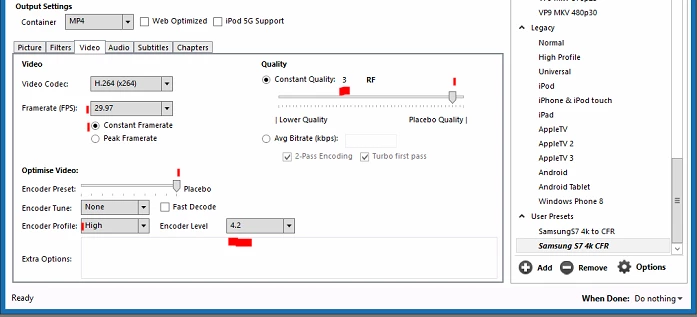
If you can't get a transcoded version from your mate ... take the files into Handbrake, and set up a preset that 1) maintains frame-size, (picture tab) and 2) is set to convert at a high level and at near placebo-settings so it doesn't compress the file more than minimally. The following graphic is the video tab of a setting I use to convert my phone media to CFR, just set the frame-rate to the same number as the source files and the Level and other settings as shown here ...
Neil


 AdChoices