


- Home
- Premiere Pro
- Discussions
- Re: "Offline material is present in this export an...
- Re: "Offline material is present in this export an...

Copy link to clipboard
Copied
When I try to export my feature length film, I get this error message and then the program crashes.
I don't have any offline material in the film. When I go to relink from the sequence file the relink button is not enabled. However, when I restart the program, a bunch of offline files do pop up before the program re-opens but non of them are in my sequence.
I rendered the entire sequence so I know that is not the issue.
Any advice?
Thank you,
Sara


 2 Correct answers
Thank you, I imported my sequence into a new project and was finally able to output. But had to re-render. So sounds like rendering was the issue.


https://forums.adobe.com/people/Sara+Nesson wrote
Thank you, I imported my sequence into a new project and was finally able to output. But had to re-render. So sounds like rendering was the issue.
yeah its a rendering issue, for next time just delete the render files no need to make a work around
and import the sequence into a new project ... when you render over and over, you have to delete
your render files from time to time
 9
Replies
9
9
Replies
9


Copy link to clipboard
Copied
1) Verify that you don't have any of that offline material hidden in the sequence my mistake.
Add the Video Usage Column to your Project Panel List View Metadata display and see if any of those off line files have instances in your timeline.
2) If you have rendered the entire timeline, then when you export try checking the box for "use Previews" and see if it will export.
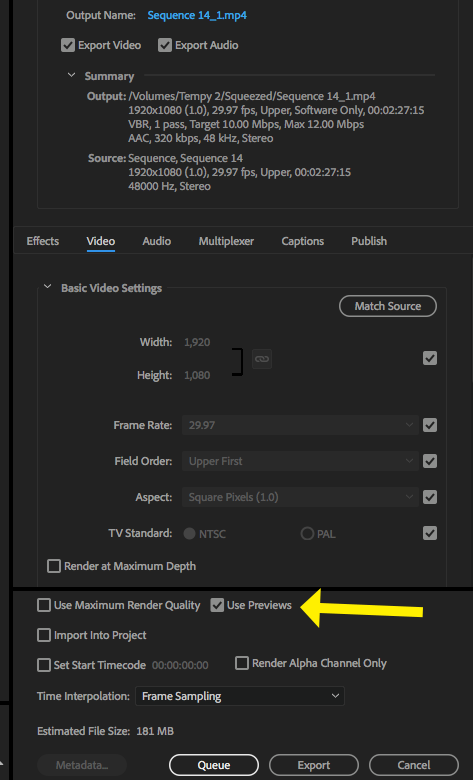
MtD
Copy link to clipboard
Copied
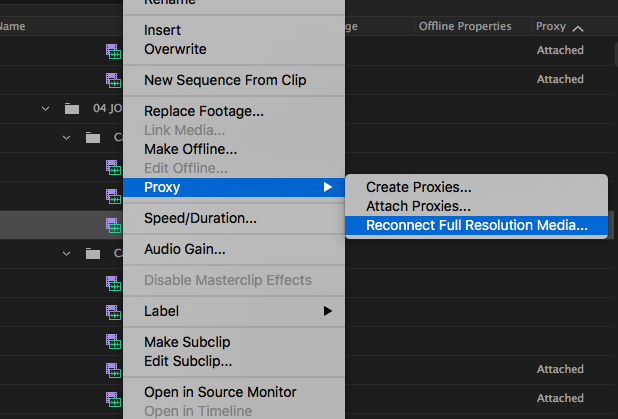
Great suggestion to add "video usage" to the metadata display. I found a ton of offline clips by comparing that column to "Offline Properties" and "Proxy" columns. I deleted them all offline clips or reconnected them, but only way I was able to reconnect them is by replacing with Proxy - Reconnect with higher resolution clips. "Relink" was not option. I've had a ton of clips mysteriously go offline when the program crashes and only way to relink them is via Proxy. So I have a ton of Proxy files. Could this be related to the offline issue I'm having?
Copy link to clipboard
Copied
I am also getting this warning when I reboot the project after it crashes when I try to export:
Video Filter missing: AE.ADBE MPEG.SourceSettings
Copy link to clipboard
Copied
@Sara Nesson
https://forums.adobe.com/people/Sara+Nesson wrote
I am also getting this warning when I reboot the project after it crashes when I try to export:
Video Filter missing: AE.ADBE MPEG.SourceSettings
for this kind of error, try to delete the render files or,
manually delete the video previews for that project
Copy link to clipboard
Copied
Thank you, I imported my sequence into a new project and was finally able to output. But had to re-render. So sounds like rendering was the issue.
Copy link to clipboard
Copied
https://forums.adobe.com/people/Sara+Nesson wrote
Thank you, I imported my sequence into a new project and was finally able to output. But had to re-render. So sounds like rendering was the issue.
yeah its a rendering issue, for next time just delete the render files no need to make a work around
and import the sequence into a new project ... when you render over and over, you have to delete
your render files from time to time

Copy link to clipboard
Copied
How do I delete the render files??

Copy link to clipboard
Copied
Dito!


Copy link to clipboard
Copied
Hi Shannon,
Choose Sequence > Delete Render Files. That should work for you.
Thanks,
Kevin


Find more inspiration, events, and resources on the new Adobe Community
Explore Now
 AdChoices