
Participating Frequently
October 19, 2024
Answered

"Relink other automatically" doesn't work. Using PR2025 version

  • October 19, 2024
  • 18 replies
  • 8862 views

I have all the project files and the footages stored in an external hard disk. Created the project and start edit on MacOS. But when connect the same external hard disk to another computer (Windows OS), I have to re-link the clips one by one. It used to be able to relink all the footages automatically. I am sure that I have ticked the "Relink others automatically".

I have tried to make all videos offline and relink them back once I have opened the project file, but unfortunately, i still have to relink the footages one by one. Is there any solution to this? I have like hundreds of footages to relink, i don't want to spend so much time to do it manually.
 

Correct answer michaelm21493719

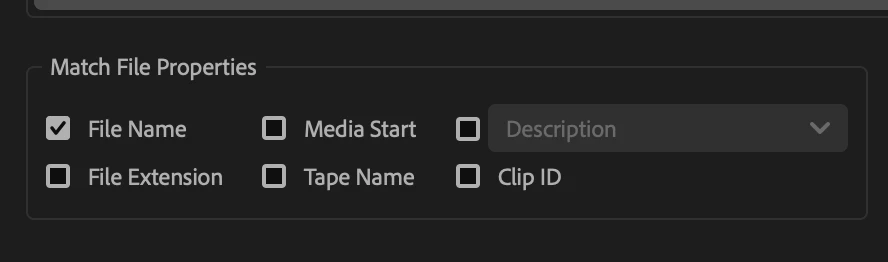
I unticked file extension under Match File Properties and it worked -

18 replies

hezrons7335741
Participant
October 3, 2025

Uncliking File extension worked for me also. Thanks.

tmksr
Inspiring
July 9, 2025

I have the same problem, (but WITHOUT switching OS between Windows and Mac).
Suddenly i have to re-link every single file in my PP-Projects on my external SSDs manually - an extreme time waster!

All my files have the .MP4 extension, but PP is looking for a .mp4 file. (Screenshot)


As recommended - unchecking the extension checkbox helped (thx for the work around) but of course feels

horrible and could be extremely risky, (or not helpful) if there are files with the same name but different formats. Which easily can happen if you use JPGs and MP4s for example… Please FIX THIS!

Mac OS 13.7.6

PP 25.1.0

Participating Frequently
July 13, 2025

Exactly! Unfortunately, Adobe doesn't seem to understand our concern (about the same name but different formats), which i have addressed since the beginning. 

However, I noticed that sometimes it works (checking the extension checkbox) but sometimes it doesn't. I am using the latest version of the premiere pro right now.

I have adobe doesn't come and tell us to rename the file names as solution 😕😕

Participant
May 11, 2025


here is the solution.
right click on the media and select this. 

michaelm21493719
michaelm21493719Correct answer
Participant
March 10, 2025

I unticked file extension under Match File Properties and it worked -

Participant
July 16, 2025

this worked!


Participant
December 27, 2024

Do this Select folder to link > Link media > Locate > Select the main folder instead of choosing a single clip and click search. PP will search the clip automatically. Select the clip and click OK

Participant
January 5, 2025

thank you so much you save my life hours 

Known Participant
October 23, 2024

My case with files are similar to Nana's. Card based media and phone footage along with additions from the client, and my own conversions from VFR to CFR (commonly for phone media) or to edit friendly codecs for materials requiring it.


I pay extra caution and meticulously craft my folder structures so that each fike type, revision, conversion or SD card received gets their own folder.


For example,

A videographer provided me with 3 sd cards from his Sony DSLR camera, but woth each card file names began with C0001.MP4. So I have them in seperate folders and categorically organized in the file & folder structure. When importing these, before the import process I create the exact folder structure through bins.


ProjectName > Footages > Videographer A > Camera Name > SD card number (or date) > Copy of Sd Card Contents


To import the files, I navigate to the relevant bin and use the import dialogue from the project browser, and select all the files, import them and organize them in sequences.


However, during the relinking process which opens first when you open a project, I discovered that even though I choose only a set of files inside a specific folder to relink, and then select the exact files, premiere pro begins to try linking other unlinked files from the list and this becomes a problem because there is a discrepancy between what PP expects as the extension and what the actual adn previously linked extensions were.


Doing this relinking on a bin by bin basis minimizes the potential for errors since the time I have faced this error. After this problem I have started to rename each Sony file or ones sharing similar names to SD1_C0001.MP4 for new projects, but as far as I know it is not advisable to cause changes in the structure of files and have been advised to keep them the way they were present in the card.

Participating Frequently
October 23, 2024

Hi @Kevin-Monahan 


Noted on that. Yes, some are card-based media while some are the video files I received from the clients. I will try to ingest the medias through Media Browser to see if it is indeed helpful for my work.


However, I really do hope that I can still turn on the 'file extension' when i'm relinking the medias as it is really helpful for me to making sure that I am linking the correct media. Hope it can be fixed! It is useless to have the option there when I couldn't use it, right?

Kevin-Monahan
Community Manager
Community Manager
October 23, 2024

Hi @nana36722464ffx2 and @cizkek_,

Thanks for the replies. I hope this information will be useful to the developers working on this case. I can understand both use cases and the challenges they present.


It’s quite odd to have the same file type with different capitalizations causing relinking issues. Is this clip from a mobile phone? When I anticipate such issues, I often take my raw clips into Bridge and rename them, making sure to place a log note next to these clips for future reference.


Regarding issues with identically named files, if you’re working with card-based media, the metadata that comes with the clip during the ingest process should help differentiate between them. However, many people import clips directly rather than ingesting them through the Media Browser, which is the method that ensures the metadata is carried along with the media, preventing such linking anomalies.


Is this card-based media? Have you tried ingesting the entire contents of the folder set via Media Browser instead of cherry-picking the media files for drag-and-drop import or importing them otherwise? I’m fairly certain that this workflow is detailed in the user guide.


I hope this helps! If you have any more questions or need further assistance, feel free to ask. We’re here to support you!


Thanks,
Kevin

Kevin Monahan - Sr. Community and Engagement Strategist – Adobe Pro Video and Audio
Known Participant
January 14, 2025

I can't take this anymore. I have never ever have felt such awful feelings for a software in my life, and this FRUSTRATION IS CONSTANT.

I even did a clean install with the cleaner tool. PREMIERE PRO 25.1 IS BROKEN SINCE v24 AND THIS HAS BEEN TAKING TOO LONG. WHEN WILL THERE BE A BUG FIX RELEASE???

The file structure is there and its never being changed. Premiere Pro suddenly decides in the middle of a project that it no longer wants to link UPPER CASE EXTENSION such as (MP4) and suddenly forgets what it had linked before, then asks to locate these files because it remembers them being LOWER CASE (mp4), which is not right! Please see the screenshots.

Oh, and it can not automatically link whatever I do (I MEAN IT, I HAVE SAID WHAT I HAVE TRIED IN PREVIOUS POSTS, NOTHING WORKS ANYMORE.)

AND NOW IT LINKS HALF OF THE FILES, AND FOR THE OTHER HALF IT JUST SAYS "generic importer error"

Very useful! /s

We have already transitioned to Affinity with our graphic design team. Premiere Pro and Lightroom are the only ones left. We are extremely dissatisfied with the service and quality of Adobe products. Open source, one-man-developer-team software is even more capable and trustworthy than the products of millions of dollars worth company. Incredible.

EDIT: I clicked on make offline for all the footages and now the unlinkable ones are suddenly available in the project, and the previously linked ones are offline. MOREOVER THE FOOTAGE WHICH IS SUPPOSED TO BE OFFLINE, IS NO LONGER OFFLINE AND THE "MAKE OFFLINE" BUTTON IS GRAYED OUT. How much more fun can this get? If I weren't losing money on this I would be having so much fun, laughing at these silly bugs.

Participating Frequently
October 23, 2024

@Kevin-Monahan there were cases where some files share the same name but different extension are saved in the same folder. so when i relink the files, it relinked to the wrong file if i do not enable the 'file extension' option. this is actually crucial for the people who is not familiar with my working style to quickly relink the files without having to waste too much time to browse thru the files to check which are the correct ones. This may not make sense to you, but that happened to me few years back. It linked to the wrong files, I have to close the project and relink them all over again. Since then, I'll just make sure I have enabled the 'file extension' option to make sure that it will link to the exact file that it was linked to. this can really minimize the possibility of linking to the wrong file that shares the same name.


Known Participant
October 22, 2024

@Kevin-Monahan 


Its is important because of the following:


In my case all of the original files had their extensions in lower case characters except for a few.


When the missing files prompt came up and the relink window opened, I noticed that PP was expecting all of the files with their extensions written in upper caee characters while in fact no modifications were made to the files, the file structures, or to the extensions.


Checking and unchecking the check-box for file extensions didn't have any effect on some bins I had when especially there was mixed case sizes in the bins and folders in the disk.