
October 29, 2017
Answered

"Unspecified Error" when conforming clip

  • October 29, 2017
  • 3 replies
  • 3105 views

So, it only happens in one of my projects, conforming certain clips. But, it never happened before the new update with those clips. The red warning comes up and says "unspecified error while conforming clip" and then eventually it just shuts down.

Has anyone else experienced this/ have a solution to fix it?
Thanks,Charlie
This topic has been closed for replies.
Correct answer excited_Genie16B8

Great list. I'm realizing that it seems to be a specific couple of clips.

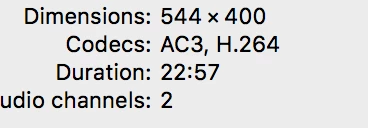
I am beginning to think it has something to do with the Codecs?

The clips that aren't working are AC3 and the ones that are, are AAC.


Do you think this could be an issue?

Thanks!


Changes to Dolby Decoding and Encoding Support

3 replies

October 30, 2017

So, after uninstalling 12.0 and reinstalling the one before it. It seems to work fine.

I believe the new Cache settings in 12.0 aren't generating Peak Files properly, causing my problem.

Adobe, please fix.

October 30, 2017

I should mention-


All my Cache files are on an external HD, considering the size and my internal just couldn't support all of them. I have a very good, fast External HD and have had NO problems with this in the past. This only started happening once I updated to 12.0.

Vidya Sagar
Participating Frequently
October 30, 2017

Hi Charlie,

Sorry for the issue with confirming. Have you tried to clear the Media Cache?

FAQ: How to clean media cache files?

Thanks,

Vidya.

October 30, 2017

I've tried this multiple times.

Thanks

Legend
October 30, 2017

Try Step 2i below.  Report back.

Unofficial Premiere Pro Troubleshooting Guide