
Participating Frequently
June 15, 2017
Answered

REC 2020 COLOR SPACE

  • June 15, 2017
  • 2 replies
  • 22048 views

Hello everyone,

I would like to Render a 4K movie with Premiere/Encoder and be able to change the color space from 709 to REC 2020,  but i cant find any button or thumbnail which makes it happen.. 
is the REC 2020 changed in the encoder at all?


thanks

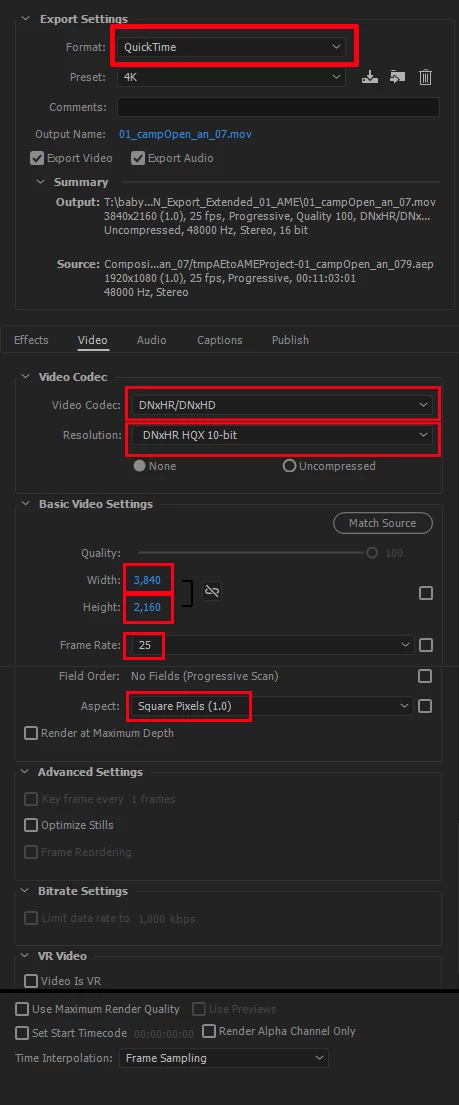
this is a screenshot from adobe encoder:
This topic has been closed for replies.
Correct answer chrisw44157881

you'd have to take the jpeg2000 rec.2020 and import into After Effects and render out embedded color profile in your codec or utility profile converter with video codec of your choice. As of now, Premiere is hard coded to only those 2 choices. everything else is rec.709

2 replies

Participating Frequently
May 20, 2021

I've researched this till my eye balls wanted to bleed! I think if Adobe could somehow add Rec.2100HLG as a Mastering Display Color Volume (Color Primaries) Export option, via HEVC/H.265; like how it's an option with QuickTime, it would makes everyone's lives better! I have a threadripper 3970X so I don't care if it's software or hardware, just Please Adobe, PLEASE add Rec.2100HLG as an option to H.265 🙏🙏🙏

R Neil Haugen
Legend
May 20, 2021

This is an OLD thread. They've completely rebuilt a number of things.


So please ... start a new thread with what you need. We'll go from there.


Neil

Everyone's mileage always varies ...
Vidya Sagar
Adobe Employee
Adobe Employee
June 15, 2017

Hi Yuval,

It is possible if you choose the format HEVC(H.265) or JPEG 2000 MXF OP1a.

Follow the steps for HEVC(H.265)

1. In Export settings, change the format to HEVC(H.265)

2. In Video tab, change the profile to Main 10 from Main.

3. Enable Rec.2020 Color Primaries

Follow the steps for JPEG 2000 MXF OP1a.

1. In Export settings, change the format to JPEG 2000 MXF OP1a.

2. In Video tab, change the Chroma and Depth to RGB 4:4:4 12-bit PQ

3. Color Primitives to Rec. 2020.

Please let us know if your requirement is different.

Thanks,

Vidya.

YUVIBAuthor
Participating Frequently
June 15, 2017

First, thank u very much for your respond vidya,

my client want this rec 2020 feature to be in the format and codec i used in the screenshot above, Quicktime, DNxHR HQX 10 bit and not H.265. is there a way for this?

chrisw44157881
chrisw44157881Correct answer
Inspiring
June 15, 2017

you'd have to take the jpeg2000 rec.2020 and import into After Effects and render out embedded color profile in your codec or utility profile converter with video codec of your choice. As of now, Premiere is hard coded to only those 2 choices. everything else is rec.709