
Participating Frequently
July 30, 2022
Question

Rec 2020 Primaries / HDR Grayed out

  • July 30, 2022
  • 3 replies
  • 2187 views

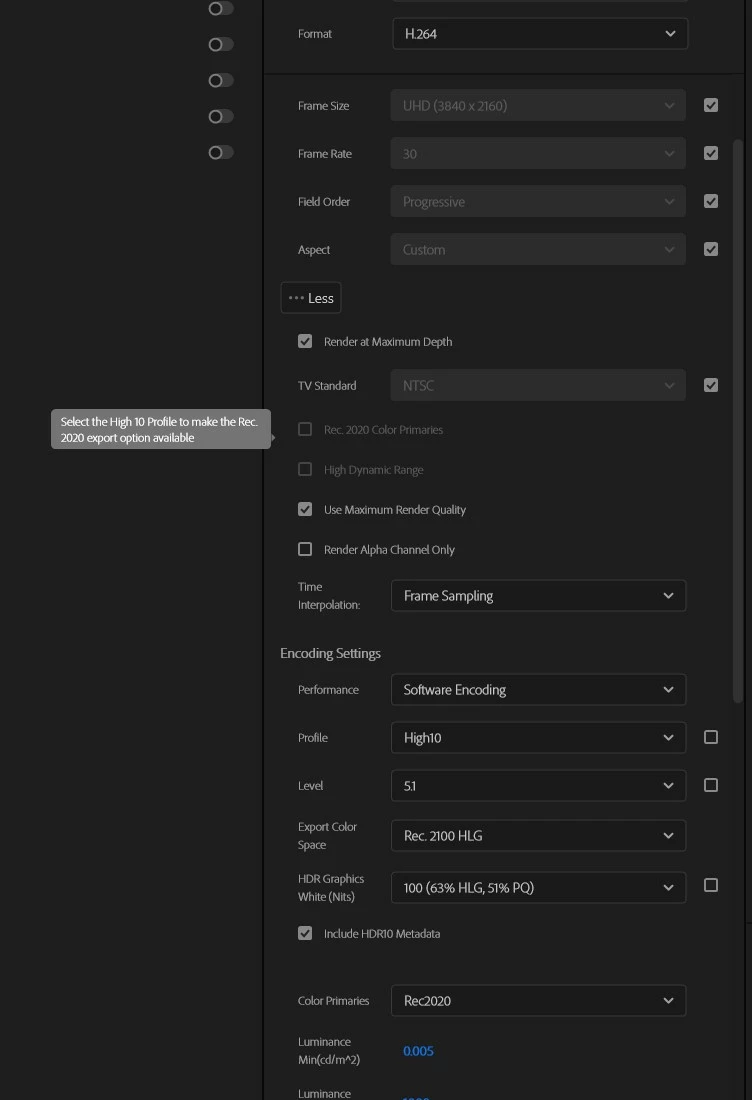
I have been trying to export my footage in HDR for youtube, and after looking at the proper settings, when selecting H.264, the selection "Use Rec. 2020 Color Primaries" is grayed out, saying I must turn on High 10 profile. However when High 10 is selected, its still grayed out, and no amount of any other settings will get it to unlock, with "High Dynamic Range" locked under Rec 2020 being on. I am quite lost at this point and YouTube does still not recognize the video as HDR with these current settings. The original video is 4K HEVC Main 10, 5.1, 10 Bit, 4:2:0. Using Windows 10 19043.1826 and Premiere

22.5 None of the other formats or settings have worked either, have tested exporting in HEVC, ProRes 422HQ, and ProRes4444 to no avail.


This topic has been closed for replies.

3 replies

R Neil Haugen
Legend
July 30, 2022

They provide HLG and PQ presets. Why aren't you using one of those already set up for HDR?


Neil

Everyone's mileage always varies ...
Jerry235Author
Participating Frequently
July 31, 2022

My goal here is to upload my videos to YouTube and have them be recognized as HDR. See details here My current settings, and the default H.264 and HEVC HLG/PG presets that you mention dont properly appear on YouTube in HDR. I am thinking this might be a lost cause, but still looking for any help/advice.

R Neil Haugen
Legend
July 31, 2022

Those have been used by a lot of people for uploading to all sorts of services.


I've seen a number of comments from people that had to figure out both how to get YouTube actually setting their uploads as HDR, as well as their own systems to play them correctly.


HDR is still far more of a challenge than most think. I know a lot of pro colorists, and most have still not delivered one HDR program to/for a paying client.


Neil

Everyone's mileage always varies ...
Community Expert
July 30, 2022

Is your sequence set to HDR?

Jerry235Author
Participating Frequently
July 30, 2022

It should be, these are my sequence settings. 

Community Expert
July 30, 2022

Does it work if you set the sequence and export to 29.97fps instead of 30.

Jerry235Author
Participating Frequently
July 30, 2022

Additionally HEVC with these settings plain refuses to export, giving me an encoder error every time.