
Participant
February 27, 2025
Answered

Recording Voiceover Records an Empty Track

  • February 27, 2025
  • 7 replies
  • 665 views

When I record voice audio onto a track, it records a totally empty track. The Audio Hardware's Default Input is set to the correct input (Scarlett 2i2). The mic is functioning properly; it records just fine in Audition. But in Premiere - nothing. Anyone know what's going on? 
Correct answer Rag and Bone

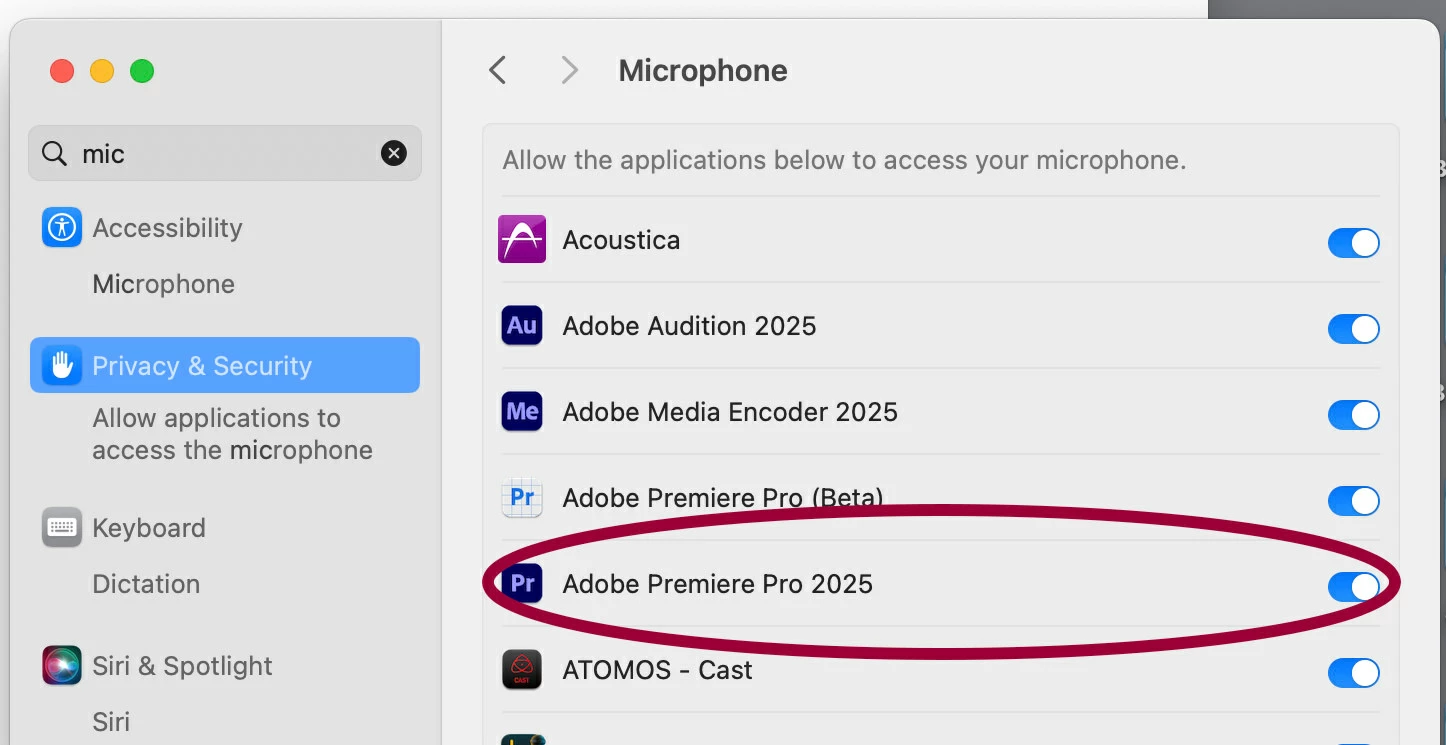
Does Premiere have mic access in your permissions?


7 replies

ACRFlickAuthor
Participant
February 28, 2025

Ohh! Thank you so much -- Yeah it was just a permissions issue in the settings. That said, I didn't get any kind of alert or anything when I kept trying and failing to record voice in Premiere. Not quite a bug issue - but if the system is aware that it doesn't have permission to use the mic, and it can see that I keep attempting it, it would definitely be helpful if it gave me some kind of alert. Thanks Rag/Bone and the rest of you! 

Rag and Bone
Community Expert
Community Expert
February 28, 2025

It's a pesky issue. I don't know if Adobe or Apple is a fault for the lack of prompting. Maybe both?

Rag and Bone
Community Expert
Rag and BoneCommunity ExpertCorrect answer
Community Expert
February 28, 2025

Does Premiere have mic access in your permissions?


jamieclarke
Community Manager
Community Manager
February 28, 2025

Hi @ACRFlick - When you open your OS settings, it doesn't look like you are getting a signal from your microphone on macOS.  Have you checked how you have your audio routed in "Audio Midi"?

ACRFlickAuthor
Participant
February 28, 2025

Thanks for the reply. I made a quick screen recording of the issue. In it, I open the Premiere settings, plus computer settings info. Tried it multiple times with the Studio Display Microphone selected as the Input. 


jamieclarke
Community Manager
Community Manager
February 28, 2025

Hi @ACRFlick - Please see the suggestions made by Kevin and Neil.  Let us know if this helps your issue.

R Neil Haugen
Legend
February 28, 2025

Might try setting Premiere to 'no default input'. And if the mic is selected in your system settings for the OS, then Premiere should see it and use it.

Everyone's mileage always varies ...
Kevin-Monahan
Community Manager
Community Manager
February 27, 2025

Hello ACRFlick,

Thanks for the question. Can you test with the built-in mic or any other mic you have lying around? What happens? I can't reproduce your issue. If you could give more information to us, we may be able to help you better. See, How do I write a bug report? You can also try standard troubleshooting with the Reset Options dialog box. Restart the app with the Shift or Alt key pressed and the dialog should launch. You can reset preferences, delete the media cache, and even  launch without plug ins there. Let me know what happens after you try that. I hope we can help you.


Thanks,
Kevin


Kevin Monahan - Sr. Community and Engagement Strategist – Adobe Pro Video and Audio