
Participating Frequently
December 7, 2022
Answered

Relink Offline media dialog Box

  • December 7, 2022
  • 4 replies
  • 853 views

Hello,
Sorry if this question has already been asked, I couldn't find it in the forum.
Maybe I didn't understand how to use this dialgue box, but in the dialog box that allows you to redo the links to the offline medias, would it be possible to paste the url of the folder that contains the medias and then click on the "search media here" button, rather than using the explorer of this dialog box?
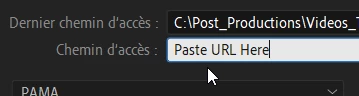

Thx!


This topic has been closed for replies.
Correct answer Suraj5EBF

It works for folder path also, if your media is inside folder 2 and folder 2 is inside folder 1 and you copy the folder 1 path then you need to click twice on the search button. it searches and locates the media.

let me know if it works.

thanks,

Suraj.

4 replies

Suraj5EBFCorrect answer
Participating Frequently
December 7, 2022

It works for folder path also, if your media is inside folder 2 and folder 2 is inside folder 1 and you copy the folder 1 path then you need to click twice on the search button. it searches and locates the media.

let me know if it works.

thanks,

Suraj.

Participating Frequently
December 7, 2022

I made tries with other folders and you're right, it works fine.
The folder I'm trying to work with is a on a mapped drive with a letter, may be the issue comes from that
I'm going to work with IP adressses
Anyway, thanks a lot for your help!

Participating Frequently
December 7, 2022

Thanks for reply,
I tried to paste the folder path (to get in the folder and then use the search button) but it doesn't seem to work.
Does it work only with media path not folder ?
Thx again!

Participating Frequently
December 7, 2022

Yes in the Link Media dialogue box you can paste the media path to locate the media files to get them back online.

Thanks,

Suraj

Participating Frequently
December 7, 2022

Sorry, I mean Path not URL 😉