
Participant
February 15, 2024
Question

relinking files from external drive

  • February 15, 2024
  • 2 replies
  • 424 views

Hi! 
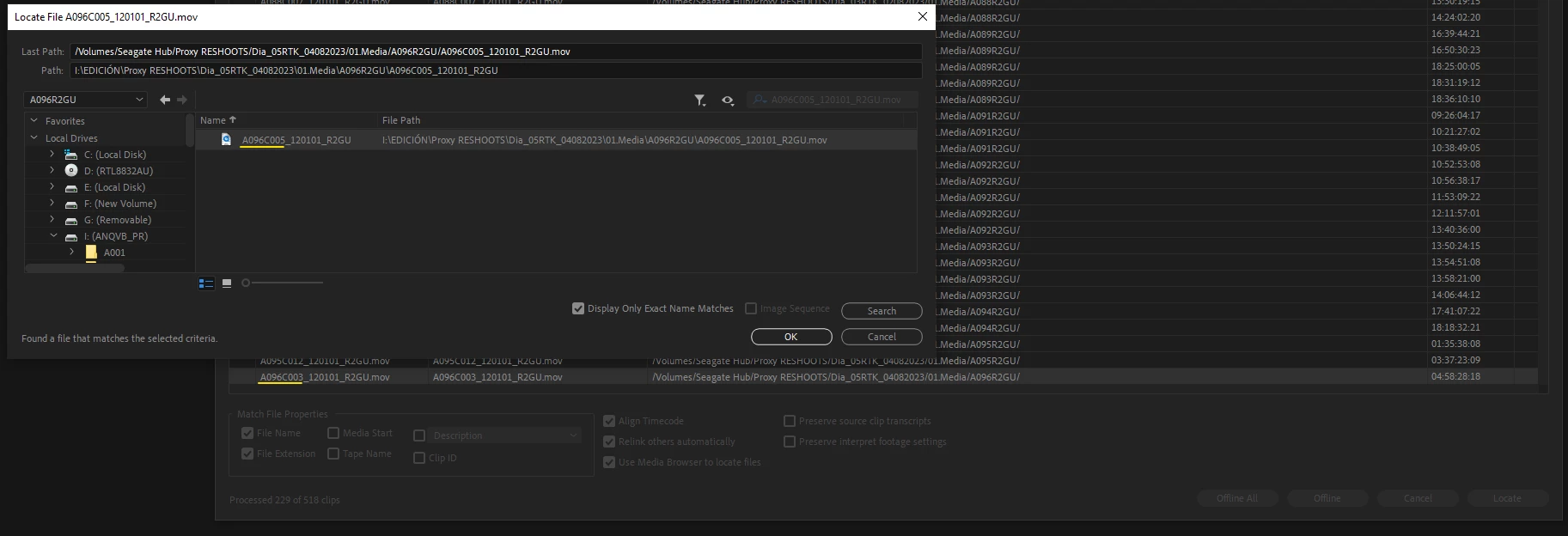
I moved the project and have files in the new external drive. Premiere is trying to relink the files with different names. I couldn't find the answer in the forum how to fix it, hope someone can help.
This topic has been closed for replies.

2 replies

Legend
February 16, 2024

I'm confused.  The file name in the "previous path" matches the file found name...  Unless I'm having a senior moment

Participant
February 17, 2024

Hi!
Thank you for the answer. Yes, it is super confusing for me also: I selected A096C003 to be located. Adobe is searching for A096C005 instead and yes, it is finding it. 

Inspiring
February 17, 2024

I've seen this behavior before as well, but in my case I wanted to relink all files in the end. Is there a reason you don't want to relink all of your files? If the folder structure is the same, but the drive letter has been changed, relinking the one piece of footage should relink the rest.

Inspiring
February 16, 2024

I think the highlighted row is just one you selected. Look at the top of the dialog box, you'll see that Premiere is trying to locate the same file that it found. Plus, the "DIsplay Only Exact Name Matches" box is checked, so you can confirm the two file names are the same.

Participant
February 17, 2024

The problem is I selected (highlited yellow) different file to be found. I was always selecting one of the missing files and then running the search. Should I do it differently? Will it solve the issue?

Legend
February 17, 2024

Not sure I understand...  You select a file with a specific name and premiere seems to indicate a file with a different name...  Can you manually relink to the file with the correct name?  Probably a good idea to duplicate your project in case things get screwed up.