
MahaB82A
January 17, 2025
Answered

Removes text in video

  • January 17, 2025
  • 1 reply
  • 2935 views

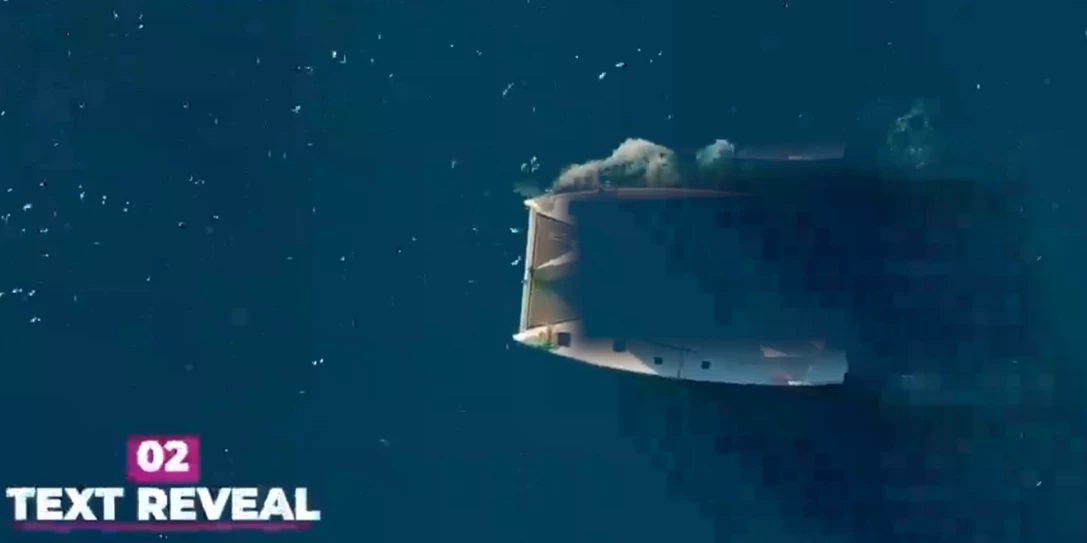
In this video text is hard-coded into video. Is there any way to remove this text only in APPr? I tried with mask but mask hides the boat as well, you can see in the screen shot. I have attached the original video as well.
 

Correct answer MahaB82A

OK I have done it in a different way. By using Ps I separated Boat from the video as PNG file. And down loaded a arial view of a calm runing sea video. By using OBJECTS PATH ANIMATION in Premiere Pro I combined the video and the boat image & got a required video. Video is attached. 
  

1 reply

Kevin-Monahan
Community Manager
Community Manager
January 17, 2025

Hey there, @MahaB82A,

Good to see you here again. I hope you are doing OK.


This is an interesting problem. To solve it, I duplicated the clips onto V2. I chopped a hole in it around the text with a feathered and expanded mask. Then, I offset the position of the clips on V1 with the Position parameters.


See if that technique works for you.


Thanks,
Kevin


Kevin Monahan - Sr. Community and Engagement Strategist – Adobe Pro Video and Audio
MahaB82A
MahaB82AAuthorCorrect answer
January 17, 2025

OK I have done it in a different way. By using Ps I separated Boat from the video as PNG file. And down loaded a arial view of a calm runing sea video. By using OBJECTS PATH ANIMATION in Premiere Pro I combined the video and the boat image & got a required video. Video is attached. 
  

Kevin-Monahan
Community Manager
Community Manager
January 17, 2025

Hey, that works!


Cheers and have a great weekend,

Kevin


Kevin Monahan - Sr. Community and Engagement Strategist – Adobe Pro Video and Audio