
Participant
June 1, 2023
Question

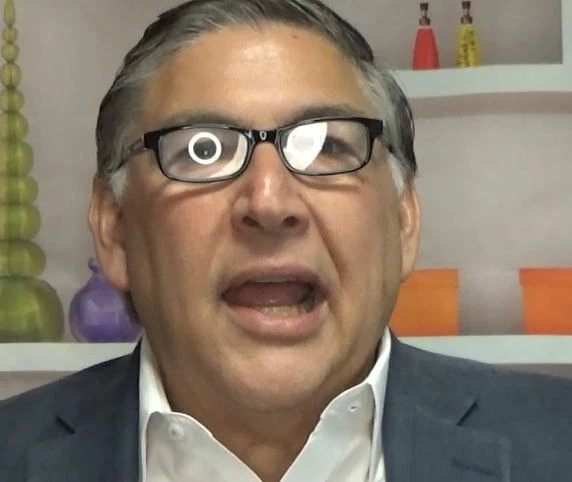
Removing ring light glare from glasses in video

  • June 1, 2023
  • 3 replies
  • 10656 views

Hello!


Can anyone provide insight on the following:


We got a new ring light, that had worked wonderfully for several interviews that my organization records, until one of our donors wore glasses. Now, there's a persistent glare from the ring light that is incredibly distracting. 


I have looked through existing tutorials and turned to google with almost-helpful results, but I am still coming up short. Grateful for any assistance. Here is a photo of the issue. Here is my email spelled out: archivist at d j h s dot org. If you reply with your email, I'll send you a copy of the video file to play with, as well. 


Thanks!
This topic has been closed for replies.

3 replies

Participant
June 2, 2023

Hello!

I appreciate your suggestion so much! My timeline to get this video edited was just pushed up significantly, and I am still so clumsy with the software and processes....how much would someone with your skillset charge to fix this issue in about 40 minutes of footage?

Thanks,

Jessica Schneider, MA
Archivist & Volunteer Director

[Personal information removed by moderator.]

Participating Frequently
June 3, 2023

Jessica,  I agree with Kevin-Monahan.


The main issue you will have with any post-production technical fix is that you are replacing someone's eyes for an extended period during emotional testimony.  It would require the skills of a Disney-level animator to make the tweaks necessary to pull it off convicingly.


Your work is important.  Best of luck going forward.

Christian.Z
Community Expert
Community Expert
June 2, 2023

The workflow for this is to to find frames where his head moves in a way that does not produce those glare. screenshots, frame holds, masking and a lot of keyframes should be able to solve it, for faster results you can apply the same theory and play around with the tracking tool in AE

Peru Bob
Community Expert
Community Expert
June 2, 2023

You might want to try Content Aware Fill in After Effects.

Participating Frequently
June 2, 2023

Content-aware fill may work, best of luck to you.


But that isn't "glare," it's reflection.  And shame on whomever was recording that interview not to notice and adjust the position of the light -- that's their job.  I know it can be very hard to interrupt an interview, especially if the person you are recording is high-prestige, but you can see why it really must be done.