
shellkursk
Inspiring
December 7, 2022
Question

rename folder with effects presets

  • December 7, 2022
  • 3 replies
  • 1722 views

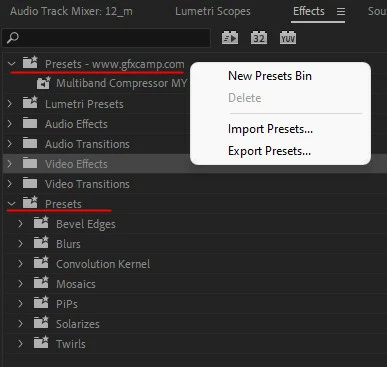
I installed third party presets and a new folder with presets appeared. I can't delete or rename it.
New presets are created in this folder.
Tell me how to fix this?


Tell me how to fix this?
This topic has been closed for replies.

3 replies

Participant
October 8, 2024

Did they seriously remove my functional, correct answer? lmao

Participating Frequently
December 7, 2022

Reset Preference if it's not working Uninstall and install again.

let us know

thanks,

Suraj. 

shellkursk
Inspiring
December 19, 2022

How do you suggest resetting all settings?

PS The fact is that all functions work properly. I am uncomfortable that I do not have the opportunity to arrange the presets in the way that suits me.

shellkursk
Inspiring
January 25, 2023

I don't think it is working properly.

Your Effects Panel looks different from mine.


Your panel is different. But I asked the developer how to rename my panel, how to transfer effects from one section to another, how to delete an unnecessary section. Is it impossible?

Ann Bens
Community Expert
Community Expert
December 7, 2022

Might want to reset preferences first as your Effects Panel is not in the correct order.

Which premiere version/build is this?

shellkursk
Inspiring
December 19, 2022

This situation has been going on for several versions. Now I have the current version installed - 23.1

Everything happened after installing third-party presets.
