

Repeating an insert of audio clips
Hey folks,
I have lately been editing some podcast elements in Premiere (because I spent years mastering premiere and have to export an AAF at end of the edit for a ProTools-run sound mix). And there is a task I need to do repetitively that is, well, very time intensive and repetitive. And as I finish my first entire season of this, I'm getting tired of spending like 4-6 hours (largely because I'm exhausted by this stage!) cleaning up these sequences using this approach to deliver each episode.
I have recorded room-tone for each interview subject (and for myself in each of these environments) and I am doing an aggressive "dialogue" pass of each of these tracks to insert nice pieces of roomtone between every gap between the useful speech AND for at least a frame between ever audio cut in the speech. I then apply short crossfades (like 4frame crossfades) across every transition. This is old-skool dialogue track stem building and possibly isn't done since I was an editor in the early 2000s, but I want to deliver really clean spoken word tracks with all jumps and glitches completely healed so that the mix team can have a really easy time mixing and setting audio levels of the resulting tracks.
It might help to mention that my editing of these subjects in insanely granular. probably 3-10 edits in nearly every sentence in the entire show, including aggressive filler word removal and heal. Many of my speakers are non-native English speakers, and I help them sound really assured and clear and confident. which they enjoy, but at the sacrifice of my sleep and energy. 😉 The latest piece, the speaker gives up on 100% of her sentences before she is done, before remembering to finish them. Hearing her without cleanup is not only extremely difficult to follow, it doesn't respect her excellent content and ideas that she is just struggling to finish in English.
Here's what I do:
- First, I do a rough pass to chop out filler words, rebuild speaking to sound great, but use NO level gains tweaks or crossfades at this stage at all. (the interviews are pretty well cut and already adjusted to similar levels).
- I then have the performances I want, but lots of messy jumps and hard cuts - if I delivered these, my sound mixing team would need to spend many hours repairing all of this to even get started.
- Then I build a big sequence of "centercut" roomtone (meaning that I don't get near introducing anything other than room tone at head or tail of a clip) and scatter these bits around to create big minute-long beds that can be duplicated many times without anyone ever catching loops or repeats of any qualities in that roomtone bed. (this is really fast because I always record 30seconds of roomtone for every interview, thank goodness)
- I setup my dialogue track with the work i have edited, and chop out any big gaps, and then....
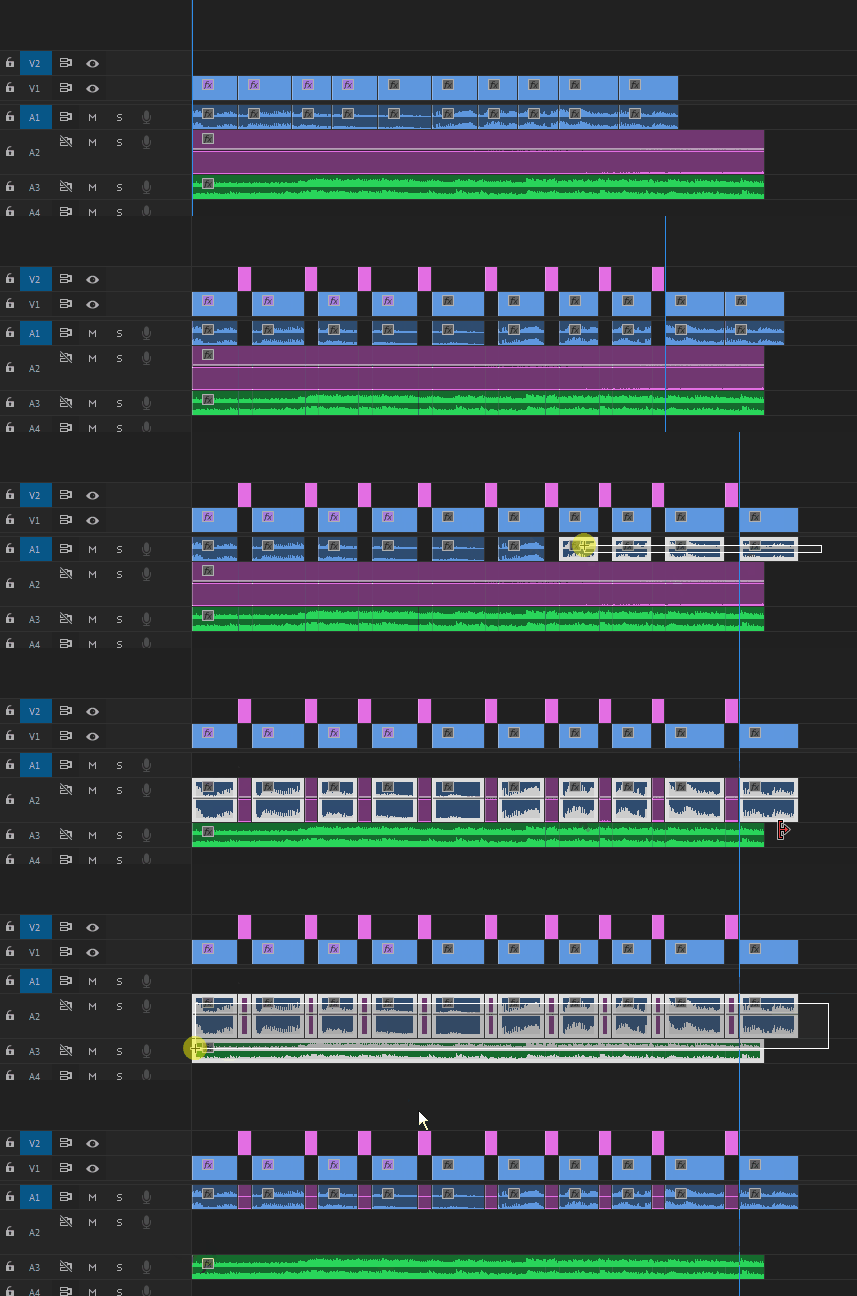
- BIGGEST TIME EXPENSE OF THIS ENTIRE ACTION! I select big chunks of audio and move every clip in that interview (hundreds of clips) one frame forward, then deselect the one at the front, and continue. The result is that there is a frame gap between every single clip in that interview. I could never do this in video, but it works really well in audio-only
- I then create a "tone" track under every spoken word track and fill it with my tone bed.
- I then select all of the spoken word, and move it down a track to overlap the tone bed. As a result, nice bits of tone go between every clip in the sequence. I select the new cluster with tone bits and move it back up to the speaker track, and apply my default 4frame crossfades across all of them.
- the results are smooth and ready to mix, unlike crossfading with out that clean tone between each bit (because some of the audio editing is down to the phoneme!)
- but i am so tired after doing this!
I'm looking for advice on what kind of automation tools might help me here. Could be roundtripping out to an EDL format where i can solve this with some sort of text script? Could be a plugin? could be some magic tool i never noticed in Premiere? Anything more keyboard-driven than mouse-driven makes me happy, including scripting!
I'm about to setup my Season Two, and am desperate to both maintain the high level of quality (and probably the insane dialogue editing to make the subjects sound really good) without losing this 4-6hrs every time I create a project. It is a big deal because my mixing team are really talented and i save them SO much time so that they can focus on taking our work and making it sound amazing. But this level of brute-force is just not what editors seem to do anymore, and I just don't know where to start.
Many thanks for any who can advise me!
--Matt
 AdChoices