
Request to Disable FX and Audio Shortcut Buttons on Clips
I frequently encounter an issue with the FX and audio buttons on clips, which often results in the timeline getting deselected and unintentionally opening the Effects Controls or Essential Audio panels.
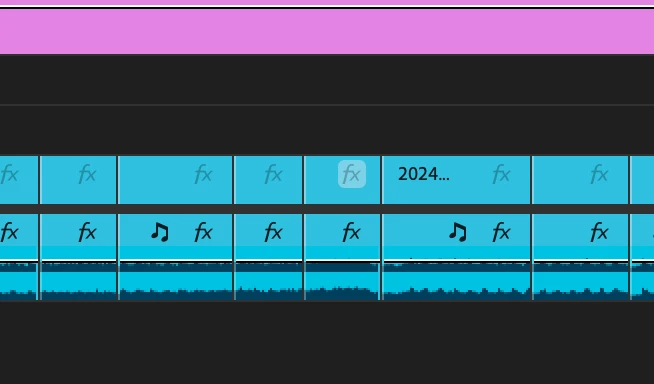
I usually work on fast-paced edits, where my selects can be a few hundred clips, each very short. The recent update has positioned the FX and audio shortcut buttons right in the centre of these shorter clips, making it difficult to select the clips without triggering these buttons. This leads to several workflow interruptions when misclicking:
- Copying Clips: When I select a clip and press Command+C, the timeline gets deselected, and I end up copying an effects control window instead of the clip (which obviously doesn't work).
- Adding Edits: Using my keyboard shortcut for 'add edit' fails because the timeline isn't selected, leaving the clip untouched.
- Deleting Clips: Attempting to delete a selected clip fails as the timeline is deselected, leaving the clip in place and attempting to initiate a delete command in the effect controls panel.
When I try to do these basic tasks, I accidentally click the FX/Audio buttons around 50-100 times per day. This slows me down and becomes increasingly frustrating.
Solution:
Can we please have an option to disable these shortcut buttons? A cleaner timeline without these buttons would prevent accidental clicks and streamline the editing process. They're helpful later on in the edit, but for making selects and throwing together a rough first cut, they're just a pain in the a**.
 AdChoices