
janssen.rgm
Inspiring
November 7, 2025
Answered

Resize Premiere Pro application window in Windows 11

  • November 7, 2025
  • 1 reply
  • 130 views

Hi, 

I can not resize the Premiere Pro application window in Windows 11 anymore. I can minimize it, maximize it but when I press the Resize button or drag the title bar, the application disappears and is replaced by some kind of widget:
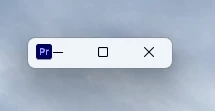
From here I can close it or maximize it again. 


Any idea how I can resize the application window? (this was working some time ago...)


Thanks,

Rob Janssen.

Correct answer Peru Bob

Try resetting the preferences:
https://helpx.adobe.com/in/premiere-pro/using/reset-preferences.html

1 reply

Stan Jones
Community Expert
Community Expert
November 7, 2025

Do you have multiple monitors?


Stan


janssen.rgm
Inspiring
November 7, 2025
Yes I do.....
but even when I configure Windows to use only one display and physically
disconnect the
second monitor, the problems stays the same, also after rebooting.

Other applications, like Lightroom or Photoshop don't have this problem.

Thanks,
Rob.
Peru Bob
Community Expert
Peru BobCommunity ExpertCorrect answer
Community Expert
November 8, 2025