
Gal Shemesh
Known Participant
September 5, 2012
Answered

Resizing pixel art video without affecting the pixels with blur.

  • September 5, 2012
  • 4 replies
  • 51940 views

Hello everyone,

First I would like to mention that I did searched for an answer to my issue on the forum but only found a thread by Rowby Goren from Jan 4, 2010, who asked a similar pixel resize question regarding to still images in CS4. He was answered to use Photoshop for this kind of task. My issue on the other hand is for handling a video that can only be edited in Premiere. I'm using CS6. My issue is as follows:

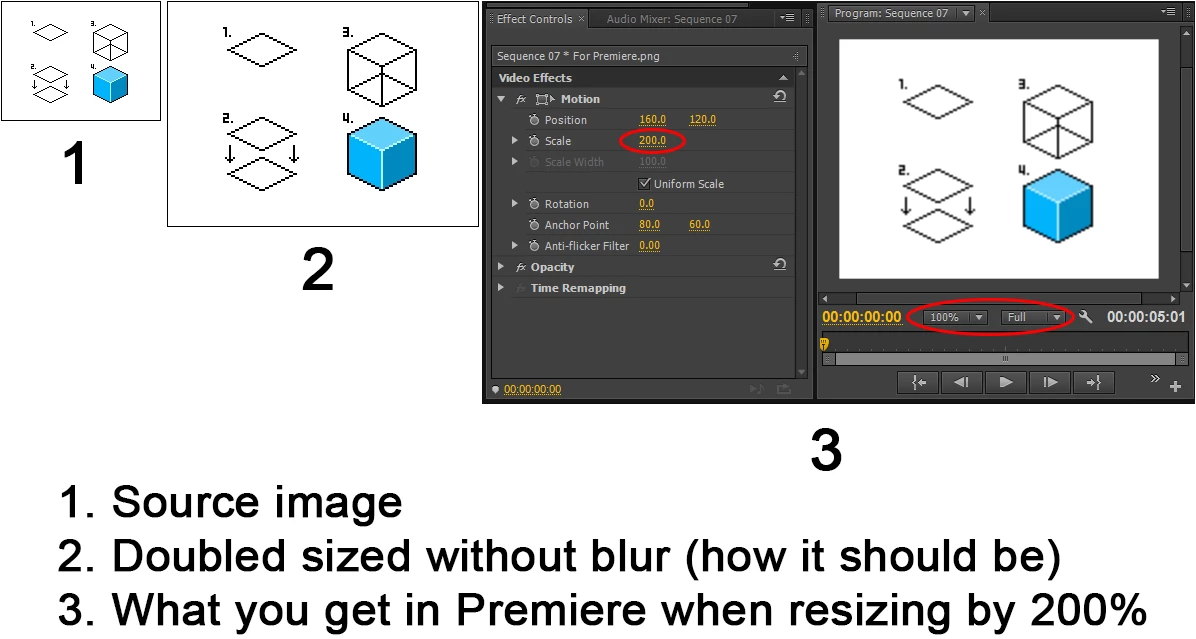
I work a lot with pixel art animation in 320x240 resolution. Usually I'm making a 320x240 scene of background and characters and the final result should be a doubled sized. So each pixel is actually 2 times larger. Just like old adventure games from the good old days that most of us remember. It works great with old style games creation engines however when I want to make a video with my pixel art creation in Premiere, I couldn't achieve an exact and clean doubled pixel when resizing the source by 200%. It always gets blurry. Does anyone knows if Premiere has any switch off option for scalling blur?

I have created an image that describes the issue. It's just a simple pixel art image that I picked up on google search. I saved and uploaded it as PNG for best quality, I just hope it won't get compressed after the upload. Any assitance will be appreciated!
Thanks,

Gal Shemesh

Correct answer Fabrazz

 this is an old unanswered post but appears way up top on the google search engine. I bet I wasn't the only frustrated with this... SO HERE'S THE ANSWER:
Right click on your image layer, Quality < set to Draft. Done, your pixelart remains sharp as if you're using "Nearest Neighbor" in Photoshop or "Point" in Unity.


I really don't know why it's so hidden... Anyhow, don't forget to render in Draft Quality as well when done. Hope this helps someone out there!

4 replies

Participant
March 27, 2023

I found a great way that works in Adobe Premiere Pro 2022.

Autokroma has this plugin called Vizual PixelPerfect.  You can get it here:

https://www.autokroma.com/blog/Vizual-PixelPerfect-Upscale-Pixel-Art-Nearest-Neighbors-Premiere-Pro


Once installed, go into "Effects -> Video Effects", and now there's "Autokroma -> Vizual PixelPerfect". Apply it to the clip, then in the Effect Controls, choose "Scale" and set it to whatever size (so, 9.00 was used in the example below) and I can change "Interpolation algo", but I've left it at "Nearest".


The result can be seen in this screenshot of the outputted 4K clip.  The original footage was an uncompressed 256 x 224 .AVI from EmuHawk, but now it has been scaled up by 9.  If you zoom right in with an image editor, you can see it's actually not PERFECT, there's like a pixel-width of distortion at most, maybe I missed a setting, but it's certainly the simplest solution that is good enough for my purposes, and is probably what you're looking for, if you or anyone else is still wondering all these years later.


Participant
April 4, 2023

My guy, believe it or not, you helped me, just a few days after you posted this! Thank you!

Participant
September 16, 2019

Another somewhat inelegant solution is to scale normally (resulting in undesireable interpolation), but then to apply the Mosaic effect to repixelize.  I've found that in order to do this you first need to scale up the source material in one sequence and then place that sequence in a second (with the same resolution).  The Mosaic effect can then be applied in the second sequence to the embedded first sequence resulting in sharp edges unaffected by the scaling resampling.


This definitely has side effects:

  • Extra blurring / contrast decrease occurs
  • The edges of the source material get blurred
Gal Shemesh
Known Participant
August 25, 2021

Hi Benjamin,


Thanks for your reply.


Yes, I'm aware of the Mosaic effect. Although it's a nice way to make video footage look roughly pixelated, it still has like you said its blur side-effect. It was not meant to be used on pixel art material.


Best regards,

Gal Shemesh

FabrazzCorrect answer
Participant
February 12, 2015

 this is an old unanswered post but appears way up top on the google search engine. I bet I wasn't the only frustrated with this... SO HERE'S THE ANSWER:
Right click on your image layer, Quality < set to Draft. Done, your pixelart remains sharp as if you're using "Nearest Neighbor" in Photoshop or "Point" in Unity.


I really don't know why it's so hidden... Anyhow, don't forget to render in Draft Quality as well when done. Hope this helps someone out there!

Gal Shemesh
Known Participant
February 20, 2015

Hi there Fabrazz,

I haven't logged-in to Adobe's forum for a quite long time (maybe over a year) and thought to login in order to see if there's an update patch of some sort that fixes another issue I raised which used to work quite well on CS5.5 [Dragging the Out Keyframes of a Clip doesn't snap properly to the last frame and disappear (CS6)‌] and saw your reply from 1 week ago for this thread. So first THANKS FOR YOUR INPUT! I really don't know why I wasn't notified via email when someone replies to my threads. I'd better go check my account settings here.

Anyway I tried to follow the steps of yours but I can't seem to find the 'Quality' option when I'm right-clicking on an image layer in Premiere Pro CS6. Thought you might meant to do this in Photoshop so I went there just to make sure and looked for this option but it's not there either. Any screenshot for where this option is hidden you can provide? I'm just like you really don't know why it's so hidden.

Many thanks!

Gal Shemesh

Participant
July 28, 2015

Hi t

I've hit this post multiple times by the means of Google while working on a project using video game sprites and I have the final actual solution, given you have access to Adobe Aftereffects.

I suggest you just make the pixel art part of your video however you want inside Premiere Pro. When you're done, import the finished sequence into Aftereffects. Here you just drag the sequence into the timeline and set it's setting to vector, which will result in the preview displaying the pixels clearly. Then just export the video from Aftereffects, setting the render quality to draft and re-import it into Premiere to add any titles or whatever. I haven't experimented with any effects and I don't know for sure what the draft render quality will do to any other components you may want to use in your video, so I wouldn't recommend rendering those things at the same time.

I hope this helps!

Tokopimv

Legend
September 5, 2012

any switch off option for scalling blur?

Scaling blur is not a 'feature' you can adjust.  When you scale video up, it get's blurry.  That's just how it is.

Gal Shemesh
Known Participant
September 5, 2012

Hi Jim, how are you doing? Thank you for the reply! But that's not quite correct though.

I've been creating computer games for many years by now and never encountered this issue before. When you scale up a digital image or video, the pixels should save their properties and not 'merge' with each other, but only double their size when scalling up by 200%. Most editing software today do the 'blurry' effect when scalling up or down an image because less and less people are working on pixel art noadays, and the blurry effect looks nice from a few meters away. Old editing tools on the other hand used to handle pixel arts quite well.

Take the Microsoft Paint that can be found in Windows XP for example. It used to handle pixel arts great when scalling up or down an image. But since Vista and OS 7 have arrived, the new Microsoft Paint has been 'improved' and now it does the same 'blurry' issue and can't handle scalling an exact pixel art image anymore. Try it for yourself on both XP and Vista/7 machines and be amazed with the difference.

I believe that there should be a way to turn off the blurring effect in Premiere for people like me who's work is still based on pixel arts (a feature request perhaps). Just like in Photoshop where you can switch off the 'antializing' feature in order to cut/paint areas in an image, without worring that the blurring effect will merge the pixels around your cut/paint area.

Then again any assistance will be appreciated!

Thanks,

Gal Shemesh

Legend
September 6, 2012

Hi Jim and ComputerNovice25, thank you both for your replies.

I don't know how much you know about old style computer games from the '80s-'90s that were based on pixel art graphics, but it has nothing to do with vector graphic whatsoever. If they were then companies that are making re-makes for those games noadays wouldn't have to handle with all the graphics from almost scratch. They would only had to take the original graphics (if they were vector based I emphasize) and resize them to large resolutions. A good example for that are the old but yet great games 'Monkey Island 1' & 'Monkey Island 2' by LucasArts. The special edition of these games were created with vector tools in order to have much higher graphics resolution to attract the audience, however the original versions were entirely pixel art creation that was drew pixel by pixel.

As far as I know, vector graphics that usually create in Illustrator are based on mathematical calculation that creates an image. Say you draw a line from one point to another, the rest of the pixels between the first and last dots are calculated in such a way that it first makes the final file much smaller in size, but you'll also be able to scale the image up and down without loosing the overall quality of the image. So a character in 200x500 pixels size can be scaled up or down to whatever size you like and the image quality will remain as if you draw the character in the larger/smaller size. And that is due to the amazing vector pixels calculation technology. That can be seen in flash videos/games.

I'm working as I mentioned on pixel art style and therefore the vector technology is not for me. That is why I'm looking for a way to work in clean pixels without the blurry effect in few of the great softwares that lies in the Master Collection suite I purchased from Adobe, which are Premiere and perhaps After Effects. If there isn't any option to handle that then perhaps Adobe should consider a feature request to achieve that in the above tools.

And just for the big idea of what pixel art can be used for, see the image below in 100% and 200% sizes (was taken by google search). No vector tools have been used to create that image. It's a pixel by pixel creation. Click to see in full resolution.

If anyone else hears of a solution for my issue please let me know.

And Jim and ComputerNovice25, thanks again!

All the best,

Gal Shemesh


That graphic shows a degraded image, as you'd expect from scaling a rasterized image.  All you're missing is the aliasing.

If you want to double the size of your image, then you should create it that way in the original program, and not scale it inside of PP.