
Restore Audio in Multicam Sequence (from source sequence)
Running MacOS Sierra 10.12.6
Premiere CC 12.1.2 (updated from 12.1.1 hoping it would solve the issue, it did not).
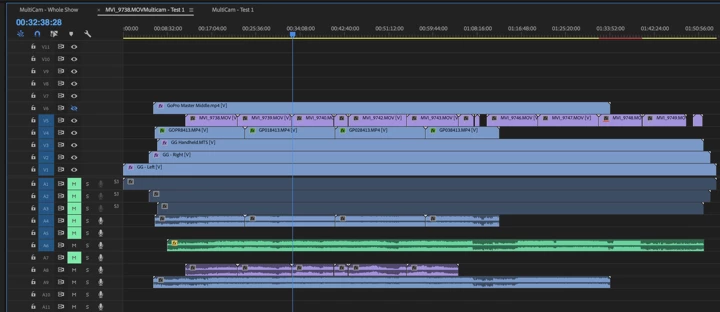
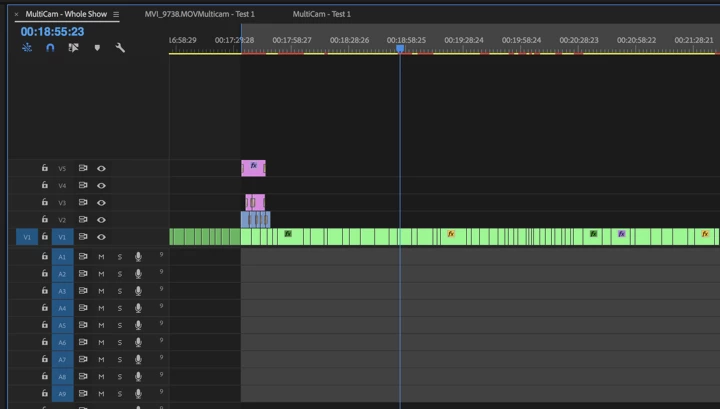
I suspect there is some human error here and hoping someone can point me to how to get my audio to play from my multicam source sequence (screen grab 1) in my multicam sequence (screen grab 2).
The background. I mixed a fairly complex multicam sequence with the intention of adding an updated, and fully mixed audio clip later, which I did. However, after I added the audio clip, inside the source sequence, I no longer hear any audio in the multicam sequence.
Looking at the screen grabs below, it appears I have deleted my audio in the multicam sequence. I don't recall doing that, but it is not there and I think that is the issue. How can I restore it in that sequence? Creating a new sequence from the multicam sequence doesn't do it. Creating a sequence from the source sequence does not have my edits, which I very much want to restore in this very long piece.
I should note, that even if I unmute all the tracks in the source sequence, I still hear nothing in the multicam sequence.
Thanks in advance,
Joan
Multicam Source Sequence
Multicam Sequence
 AdChoices