

Reveal in Explorer Custom Shortcut Unresponsive
Hi Premiere Pro Team,
I have my keyboard shortcuts set to Alt+R to reveal a clip from the Timeline Panel to the Project Panel. I use the same Alt+R shortcut to reveal from the Project Panel in Explorer. However, this custom shortcut no longer works to reveal in Windows Explorer. It actually has not worked for a while now in various builds for the past year. I just never got around to reporting this bug. Here is a screenshot to illustrate the problem:
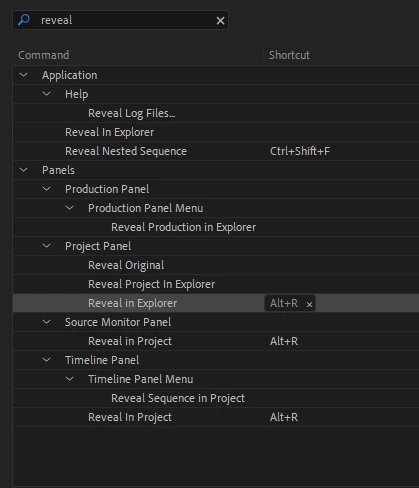
The keyboard shortcut revealing from the Timeline Panel to the Project Panel does work, just not from the Project Panel to Explorer.
I can still right+click on the clip from the Project Panel and select the option, which works. But that is extra clicking and takes me too long to find the option every time.
 AdChoices