

Brandon Loshe
Legend
November 7, 2023
Question

Reveal in Explorer Custom Shortcut Unresponsive

  • November 7, 2023
  • 1 reply
  • 876 views

Hi Premiere Pro Team,


I have my keyboard shortcuts set to Alt+R to reveal a clip from the Timeline Panel to the Project Panel. I use the same Alt+R shortcut to reveal from the Project Panel in Explorer. However, this custom shortcut no longer works to reveal in Windows Explorer. It actually has not worked for a while now in various builds for the past year. I just never got around to reporting this bug. Here is a screenshot to illustrate the problem:
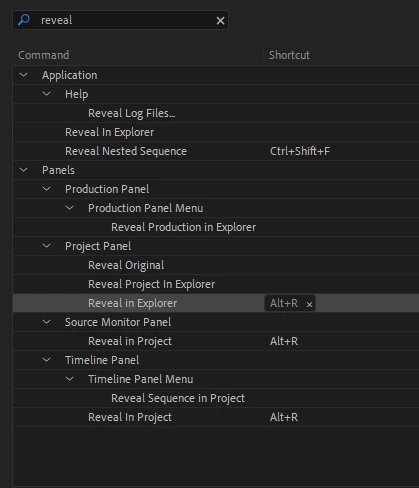


The keyboard shortcut revealing from the Timeline Panel to the Project Panel does work, just not from the Project Panel to Explorer.


I can still right+click on the clip from the Project Panel and select the option, which works. But that is extra clicking and takes me too long to find the option every time.

1 reply

Participant
November 6, 2024

I too am experiencing the same issue.

Averdahl
Community Expert
Community Expert
November 6, 2024

Are you using Alt+R (or any letter) as well? 

Stan Jones
Community Expert
Community Expert
October 6, 2025

@Averdahl - Thanks for the idea, but that did not work, either. 


It's exactly like @Stan Jones said. Right+clicking and slecting the option from the menu works, but that takes so much extra time when it's a command that I frequetly use. 


@Brandon Loshe,


Yes, the regular menu item works for me.


But as also described in my post, I'm agreeing with Averdahl: mapping ONLY the application level shortcut (as Alt+R) works BOTH in the timeline and the project panel.


If that does not work for you, try this: change your shortcuts to the Adobe default. Add Reveal in Explorer under Application ONLY as Alt+R. Click Okay.


Select a clip in the timeline or in the project panel: for me, Alt+R opens each in Windows Explorer.


I'm not sure I saw it: at present you are on Win 10 or 11? And what version of PR?


Stan