
Inspiring
February 5, 2022
Answered

Ripple edit blocked on a photo

  • February 5, 2022
  • 1 reply
  • 658 views

Why would Ripple Edit (B) not work on a photo? In this screen grab, I am dragigng from the right side of this photo. Note how the size of the photo is unchanged:
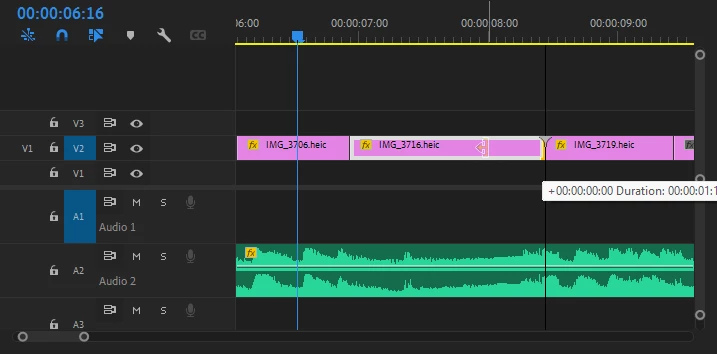
Strangely, if I use the Selection Tool (V), I can trim the photo's duration. Obviously, that's not good because it leaves a blank space to the right.

There are videos later in the sequence, on the V2 track, and ripple edit works fine with them.

This topic has been closed for replies.
Correct answer Aren Cambre

Problem solved.


Immediate solution: lock A2. That track has my background music.


True cause: Earlier, I inadvertently used insert instead of overwrite to place a video a few seconds into my sequence. My background music in A2 was split and second half moved to right to start after inserted video. In my undoing of that error, instead of undoing the split music, I instead managed to keep the split but butted the two A2 clips against each. I made a durable fix by deleting the second part of the audio in A2 and expanding the first part to its original length.

1 reply

Inspiring
February 5, 2022

Wow, this is super intuitive. Everything after this video, which immediatelty follows the photos, can be changed with the Ripple Edit tool. Ripple Edit is blocked for this video and everything before it.

Is this video super glued to the sequence? Huh?

R Neil Haugen
Legend
February 5, 2022

Sounds like Premiere might be looking at the audio track, and 'blocking' it due to what if feels are linked audio issues ... perhaps. I get this at times, where the audio isn't even actually linked but Pr seems to think so.


Neil

Everyone's mileage always varies ...
Inspiring
February 5, 2022

Premiere Pro falsely claims that there is osme volume level effect:

Nope:

Despite this incorrect effect indicator, maybe looking at effects is a red herring, as I guess effects should never block ripple edits?