

Stormadv
Inspiring
January 28, 2022
Answered

Roll/Crawl horizontal text in Premiere Pro 22

  • January 28, 2022
  • 5 replies
  • 15173 views

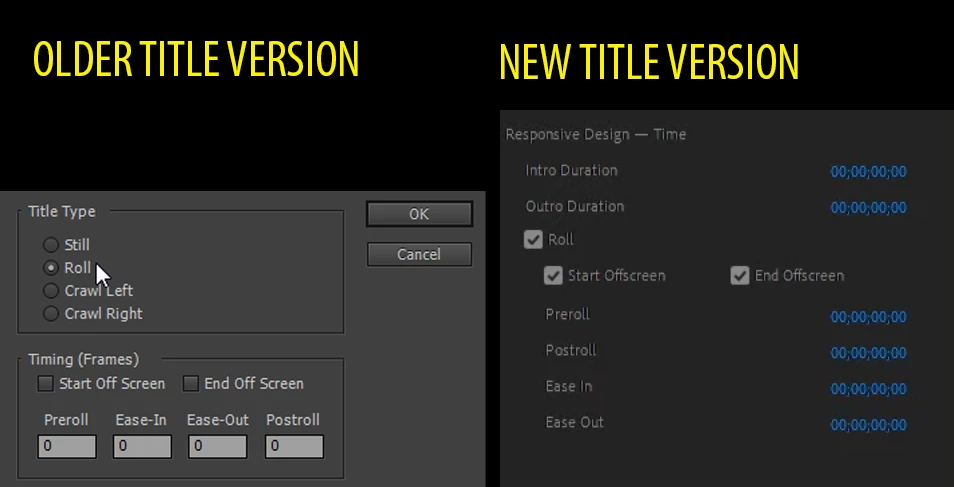
Having eliminated the old titler in Premiere, which had an automation in the management of scrolling text (Horizontal or vertical) in the new title section, I cannot find the automation to scroll a text horizontally but only vertically, unless don't use keyframes. Is there any automation in the new title generator or has it been eliminated entirely?
 

Correct answer Ann Bens

As of now, there is only Roll.

For crawl, you will have to animate yourself.

5 replies

Participant
January 15, 2025

Hola Amigos!

No hablo inglés, pero el problema de quitar el crawl, es que nos vemos obligados a terminar nuestros textos fuera de pantalla, cortar o en mascarar para que esta desaparezca en la ubicación. Espero que los de Adobe se avispen y vean lo necesario que es, saludos cordiales desde Chiguayante Chile y que paza oee!

Participant
August 25, 2023

Hopefully crawling will come back with the next edition. I just spent a very frustrating time with Adobe support, three separate people in support I spoke to tried to sell me a solution using keyframes, and Im still not convinced they really understood the significance of the problem.  

Participating Frequently
November 14, 2023

+1 Duncan! It was crazy for Adobe to dump the legacy titler and not add back ALL of its features -- INCLUDING crawl -- in the newer iterations. This was a VERY popular feature and for Adobe to overlook it or not include it immediately was a BAD decision! Having to do manual crawls is a royal PITA, so Adobe engineers, GET BUSY AND BRING A CRAWL TOOL BACK!! 

Participant
June 9, 2022

It is very unfortunate you cannot use the new essential graphics tool with very long horizontal scrolling text, because the maximum Y-Position is -32768 which makes the rest of my scrolling text not being displayed. I'd wish there was a horizontal crawl tool like in the old title version!

R Neil Haugen
Legend
June 9, 2022

Have you searched for posts like this on their Premiere Pro UserVoice system? As that's where:


1) The development team gets all posts listed in their internal system for review and

2) The all-important M&E people get collated versions of all posts filed.


That second one is really the more important ... as the M&E people seem to be the ones above the teams, that make many if not most of the major app decisions for the various Adobe apps. They work by metrics ... and that is the one place we users can add metrics for them to use.


(This forum being seen by Adobe folk as primarily user-to-user ... )


Neil

Everyone's mileage always varies ...
Participant
February 28, 2023

Thank you for your comments Neil. You think with a big push from users, Adobe will send us an update with a Text Crawl function for us to use this year?

R Neil Haugen
Legend
January 28, 2022

Yea, they should have crawl, but don't. Still, it's easy enough to animate.


Add your text in that one long line, to the EGP. Then go to 10% on monitor image, and start just before you want the crawl to start. Drag the text just off-screen right, and click the animate posiition option.


Now go to where you want it to end, drag the text off-screen left, done.


And yea, it again would be nice with a built-in option.


Neil

Everyone's mileage always varies ...
Stormadv
StormadvAuthor
Inspiring
February 4, 2022

Neil, of course it's not complicated to animate everything, but before it was even easier with an integrated function and a comfortable interface for settings, which i don't understand why they removed.

Ann Bens
Community Expert
Ann BensCommunity ExpertCorrect answer
Community Expert
January 28, 2022

As of now, there is only Roll.

For crawl, you will have to animate yourself.

Stormadv
StormadvAuthor
Inspiring
January 28, 2022

Too bad, before it was so comfortable, patience.