
gabidoll
Participating Frequently
March 22, 2020
Answered

Rotating video in PP

  • March 22, 2020
  • 3 replies
  • 682 views

Shot some footage vertically and I'm wondering if there's a way to flip it horizonally.

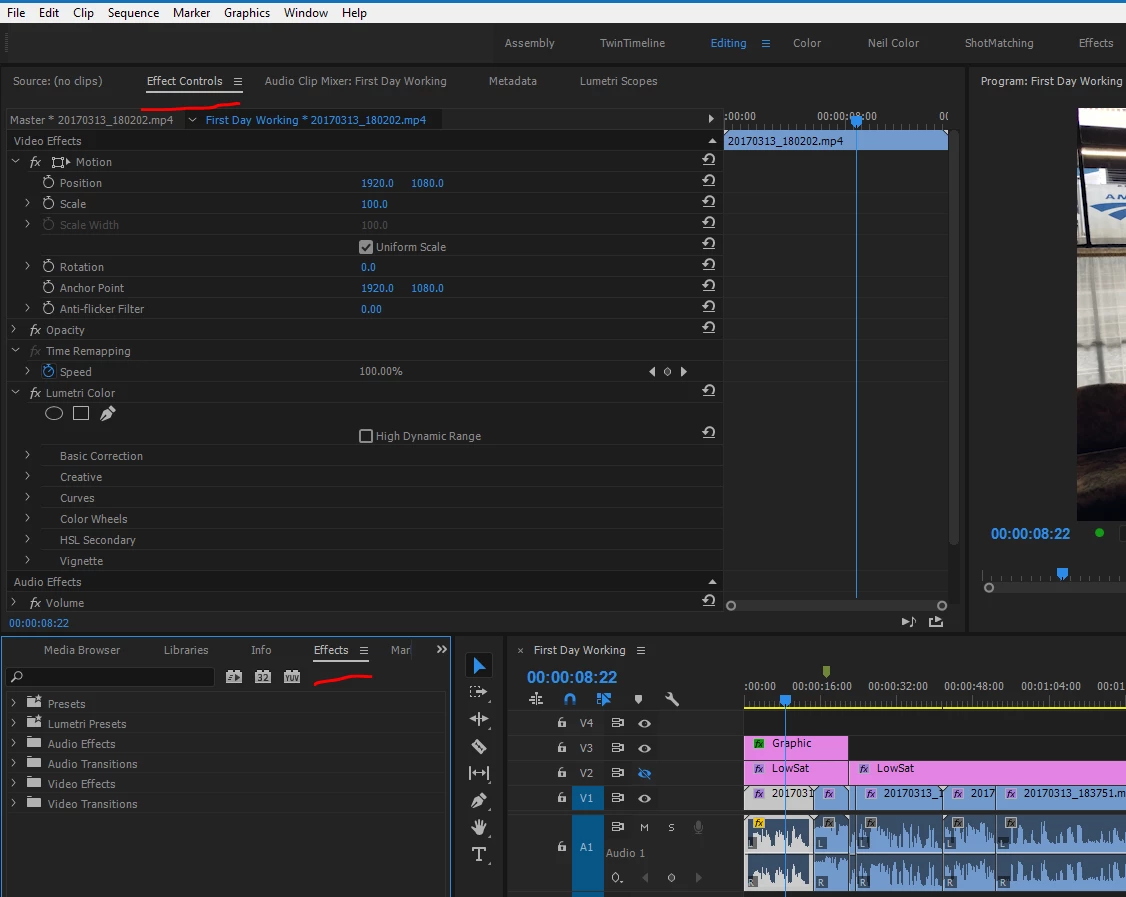
I'm in Effects > Transform > and Horizontal Flip/Vertical Flip and those options are only adjusting the image, not the actual clip.

Any insights? Thank you!
This topic has been closed for replies.
Correct answer R Neil Haugen

That's the Effects panel ... you need to go to the Effects Control Panel ... where the controls for both the "intrinsic" built-in timeline and all effects you add to a clip or sequence appear.


Neil

3 replies

R Neil Haugen
R Neil HaugenCorrect answer
Legend
March 24, 2020

That's the Effects panel ... you need to go to the Effects Control Panel ... where the controls for both the "intrinsic" built-in timeline and all effects you add to a clip or sequence appear.


Neil

Everyone's mileage always varies ...
gabidoll
gabidollAuthor
Participating Frequently
April 4, 2020

Thank you! I was able to find it once I selected the clip and stopped looking at the main Timeline reference.
I found it in the other clip reference view & I had to rotate it 270 degrees.

Thank you Mr. R Neil! 🙂

R Neil Haugen
Legend
March 22, 2020

If you are trying to change individual clips on a set timeline, you should be able to select the clip, then go to the Effects Control Panel (ECP), and use the Motion effect at the top of the panel ... Rotation should be usable to set it to the correct orientation, the Scale and Position to properly place it.


Neil

Everyone's mileage always varies ...
gabidoll
gabidollAuthor
Participating Frequently
March 24, 2020

Thank you! That's exactly what I need to do.
Any insights on where this Motion effect is? I've searched the Effects tab and I'm not seeing it even after a search....?


R Neil Haugen
Legend
March 22, 2020

I'm trying to figure out what you're asking ... are you wanting to both rotate the image and have it be on a horizontal sequence? If so, you'd need to change the sequence settings for frame-size to horizontal layout to match the clip.


Neil

Everyone's mileage always varies ...
gabidoll
gabidollAuthor
Participating Frequently
March 22, 2020

Thanks for your response!

All the other clips in the timeline are great, it's just a few that I would like to rotate to match. Would changing the sequenece and frame-size effect the entire timeline?
New to this...thanks again! 🙂