
Save file thumbnail icon issue
Hello,
I recently had an issue and called support services, they took control of my computer and did their job. No issue there, they were able to get premiere pro to work correctly. My issue is they changed the saved file thumbnail icon and I want it back to the original. image-1 (Brick-Stone) shows the original icon and image-2 (123) shows what it looks like now.
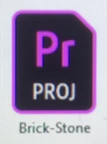
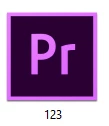
I've tried completely uninstalling premiere from my computer c and d drive files. Then uninstalling Adobe CC. and reinstalling everything all over again. but the thumbnail icon stayed the same.
My question is how do I change the saved file thumbnail back to the original style? Although Premiere works fine and this is cosmetic, I'm a designer and things like this grind my gears.
Help to resolve this would be greatly appreciated
-Thank you
 AdChoices