
Known Participant
July 18, 2017
Answered

Scaling 4k into a 1080 Premiere Pro sequence

  • July 18, 2017
  • 1 reply
  • 4107 views

Hello,

I have a 1080 sequence and when I edit in my 4k 3840x2160 footage it is scaled up very large cutting off some of the picture.  When I try to scale it down it makes the image smaller in the screen but still cutting off the picture.  I can't find the "scale to frame size" option, but am not sure if this is the solution anyway.

I have begun cutting the show already and originally created the sequence from the 4k clip.  Then started laying in Broll which is 1920x1080 and rescaling it. Mistake.  Client says deliver 1920 x 1080.

Premiere Pro CC 2017 on a Macbook Pro

Thank you very much,

Patrice
    This topic has been closed for replies.
    Correct answer Ann Bens

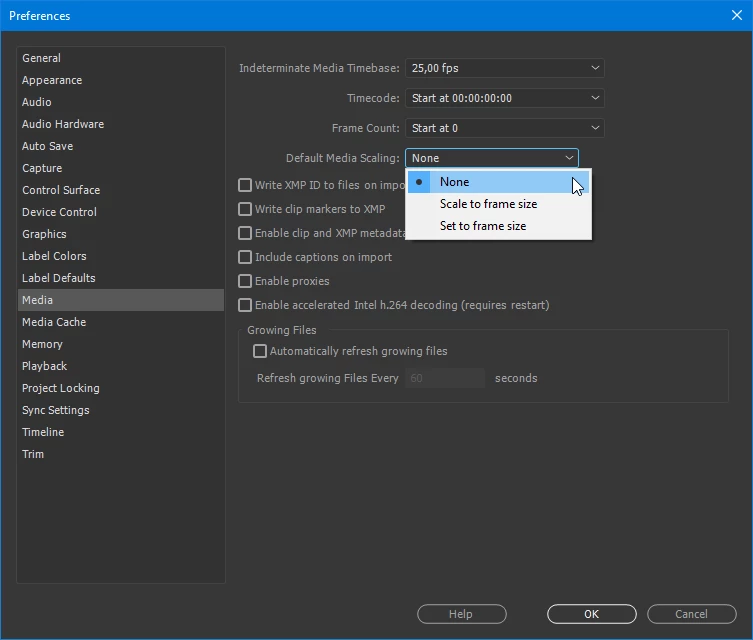
    In the preferences it is set before importing.

    If already in the timeline, select clips, right click and Set to Frame size.

    If you set it to Scale to Frame size you wont be able to zoom in on the image without loosing quality.

    1 reply

    Ann Bens
    Community Expert
    Ann BensCommunity ExpertCorrect answer
    Community Expert
    July 18, 2017

    In the preferences it is set before importing.

    If already in the timeline, select clips, right click and Set to Frame size.

    If you set it to Scale to Frame size you wont be able to zoom in on the image without loosing quality.

    PatriceShAuthor
    Known Participant
    July 19, 2017

    Thank you, Ann.  Love your cat!

    Patrice