
Participating Frequently
December 13, 2022
Question

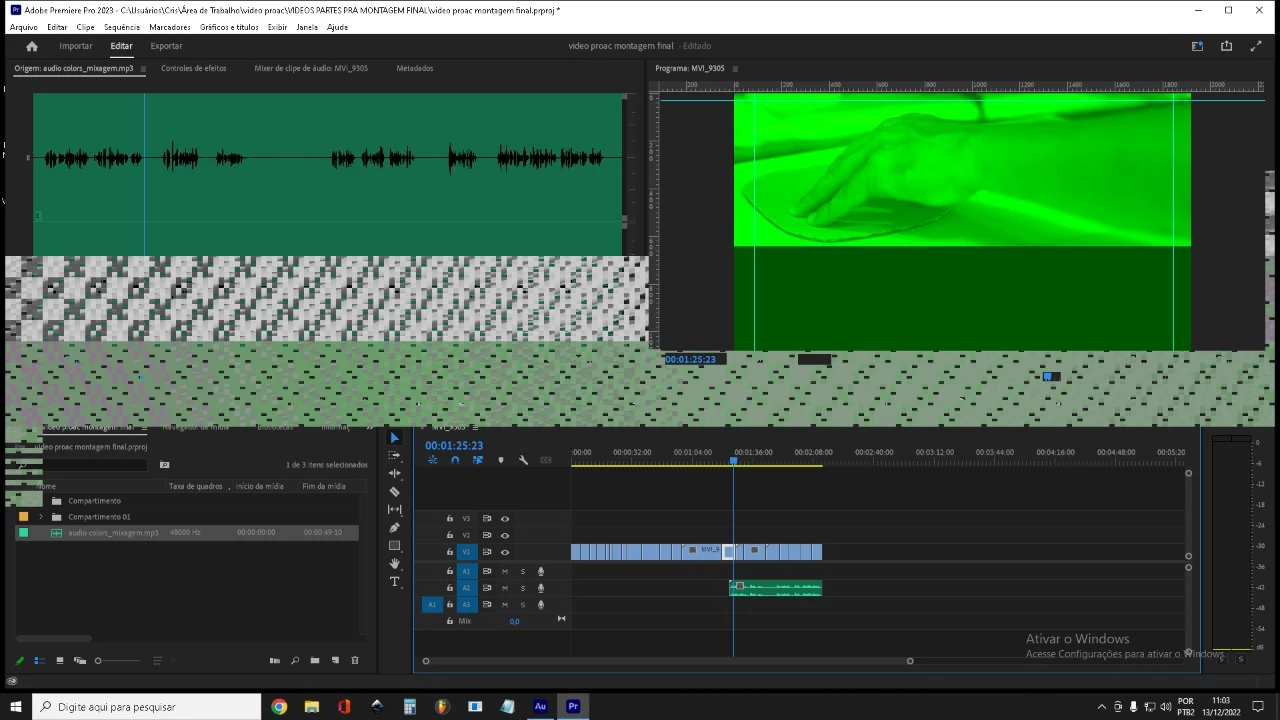
Screen turns green and strip bar in timeline
  • December 13, 2022
  • 2 replies
  • 1512 views

Hello, how are you?
I'm having a problem while editing videos in Adobe Premiere. A green screen and a bar with small frames appear on the screen. In the cc version this did not happen. The biggest problem is that this error is in the exported video.
My computer has an amd radeon 7800 series video card and 24 ram of memory, windows 10


Thanks


Cris


[title edited by mod]

This topic has been closed for replies.

2 replies

Peru Bob
Community Expert
Community Expert
December 13, 2022

If that doesn't work, delete the Media Cache and Media Cache files:
https://community.adobe.com/t5/premiere-pro/faq-how-to-clear-your-media-cache-in-30-seconds-in-premiere-pro-2020/m-p/11017257/thread-id/260446?page=1

If that doesn't work, try resetting the preferences:
https://community.adobe.com/t5/premiere-pro/faq-how-to-reset-trash-preferences-in-premiere-pro/td-p/8236158?page=1

If that doesn't work, try resetting the Workspaces:
Reset a workspace
Reset the current workspace to return to its original, saved layout of panels.
1. Do one of the following:
• Click the Workspace menu icon and select Reset to Saved Layout.
• Choose Window > Workspace > Reset to Saved Layout.
from here:
https://helpx.adobe.com/premiere-pro/using/workspaces.html

If that doesn't work, try Preferences > Audio Hardware and set Input to None.

If that doesn't work, try creating a new project and import the old one into it.

Participating Frequently
December 17, 2022

Hello

None of them has worked.
I think my problem is on my video card. Thank you so much for help me

R Neil Haugen
Legend
December 17, 2022

With Nvidia cards at this time ... the last workable driver is 517.40.


Go to the Nvidia site driver, their older driver list, and download and install the 517.40 Studio driver in a "clean install".


Neil

Everyone's mileage always varies ...
Peru Bob
Community Expert
Community Expert
December 13, 2022

Try updating or rolling back your graphics driver.

Participating Frequently
December 13, 2022

I did that but it didn't work 😞