
Participant
October 2, 2024
Answered

Sequence Button Editor

  • October 2, 2024
  • 2 replies
  • 564 views

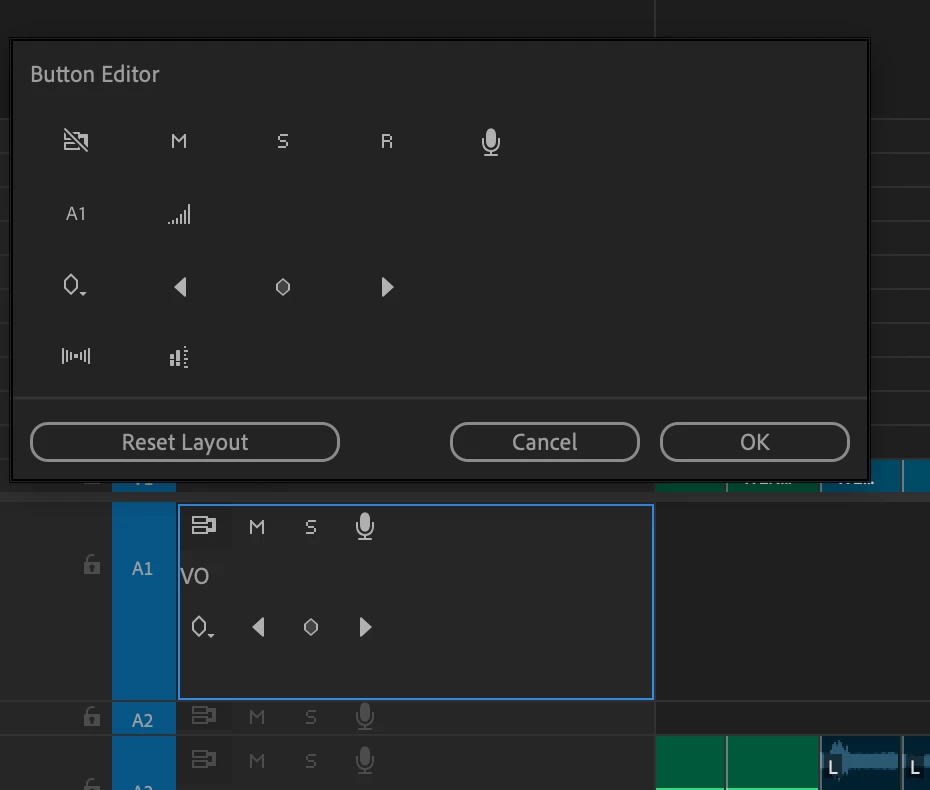
Anyone have tips on using the button editor in the sequence? I would love to remove the voice-over record button. But the editor does not seem to repsond the same way the button editor beneath the Program monitor responds.
 

Correct answer Ann Bens

Cannot remove items from the header.

Just move it down to the 4th line. Less noticeable.

2 replies

Ann Bens
Community Expert
Ann BensCommunity ExpertCorrect answer
Community Expert
October 2, 2024

Cannot remove items from the header.

Just move it down to the 4th line. Less noticeable.

Averdahl
Community Expert
Community Expert
October 2, 2024

I tried but it seems that this cannot be done. I looked in the timeline menues as well but found nothing.


Just curious, why do you want to remove it?

Participant
October 2, 2024

I occasionally miss-click it if I am soloing a track. I have never once in my life used it intentionally. And I am always looking for ways to make my display more minimalist. I'd happily remove the sync and track lock buttons as well.


Well, thanks for taking a look. Appreciate it.

Averdahl
Community Expert
Community Expert
October 2, 2024

You can do what @Ann Bens suggested and move it down to the 4th line.


As you can see the icon is now gone from all normal height audio tracks. To see it one must size it as large as Audio 2 in this image.