rajatch
Participating Frequently
July 23, 2020
Question

Setting Premier Pro's Audio output to default Speaker | Windows 10

  • July 23, 2020
  • 2 replies
  • 1761 views

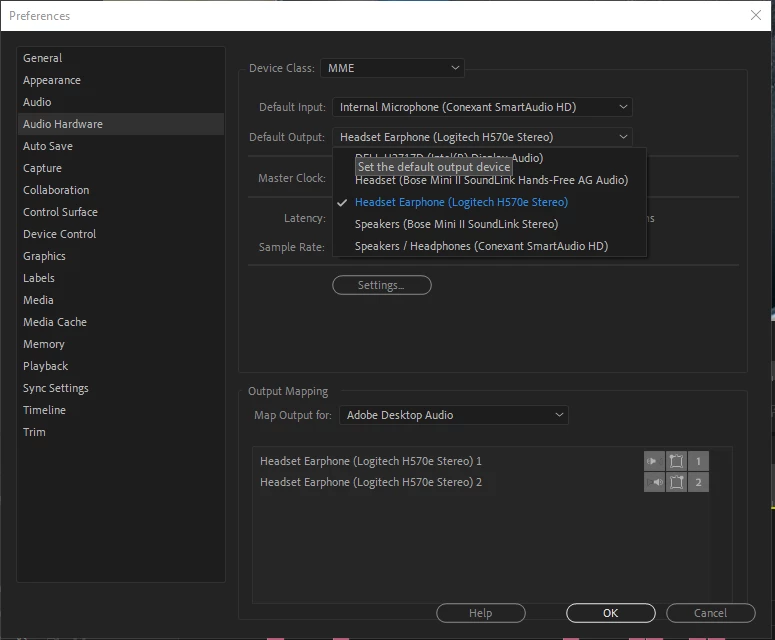
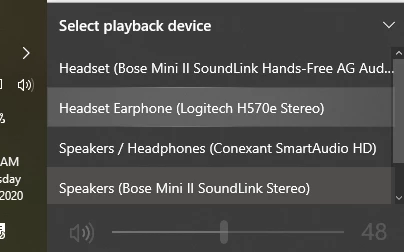
I happen to have 3 audio output devices connected to my Windows 10 device. One headphone, one speaker of the laptop itself, and one bluetooth speaker. 


Windows 10 allows me to change the active speaker from the system tray but Adobe premier pro doesn't honor that. I have to go to Edit > Preference > Audio Hardware and change the default-output field to the speaker I want. 


How can I make Premier Pro just follow whatever Audio-output I choose on Windows 10 System Tray.


This topic has been closed for replies.

2 replies

rajatch
rajatchAuthor
Participating Frequently
July 25, 2020

Thanks for responding Phillip. Yeah, it's very problematic right now. In the work from home, situation I have different audio devices connected for meetings, music and normal browsing. Painful to keep switching it when using Premier Pro

Community Expert
July 24, 2020

I'm not sure that there is a way to have it do it automatically if you're changing it frequently. Personally, I have a shortcut for Audio Hardware (Ctrl+H) to make it easier to switch inside of Premiere. I feel like I heard about this functionality recently - maybe it's in 14.3 (I'm still using 14.2), or possibly it's in an upcoming update. Or maybe someone else knows something I don't 🙂 It would indeed be convenient.