Answered
Show all frames in the timeline - CC version
Show all frames option is not available in the track header anymore. How can I see all the frames inside the clips in the timeline?

Show all frames option is not available in the track header anymore. How can I see all the frames inside the clips in the timeline?
Click the picture of the wrench (or spanner if you're British) on the timeline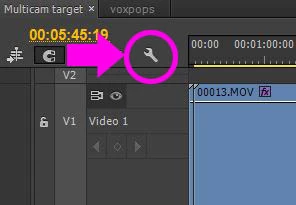
Tick "show video thumbails" from the dropdown menu
THEN go to the flyout menu on the top right of the timeline and choose "continuous video thumbnails"
There are lots of great options in that menu for customising your timeline settings.
Also you can create and save presets for these settings.
Already have an account? Login
Enter your E-mail address. We'll send you an e-mail with instructions to reset your password.
 AdChoices