
Question
Side-chain Channel Map in Premiere Pro?
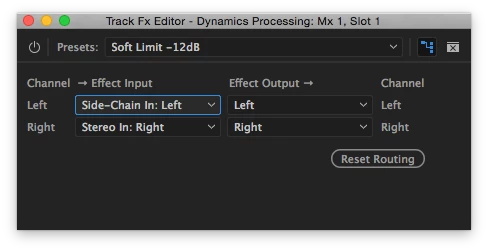
I've searched without luck for an explanation of the "Side-Chain In:" option in the channel map of the Dynamics Processing dialog in Premiere Pro. Like so many, I am hoping to duck some audio within Premiere without using Audition. So can anyone tell me what the Side-Chain option, shown above, is for and how to make use of it?
Thanks!
Charlie Essers
 AdChoices