
Inspiring
August 23, 2021
Answered

Simple 3D transitions behave strangely

  • August 23, 2021
  • 3 replies
  • 1186 views

I have two simple clips and I have applied the simple Cube Spin transition but I am getting a very weird effect instead. It is difficult to explain so I made a short video so you can see what it going on:


I have tried with other simple transitions as well, like Flip Over with similar results. I am including a screenshot of the work screen in case it may help:
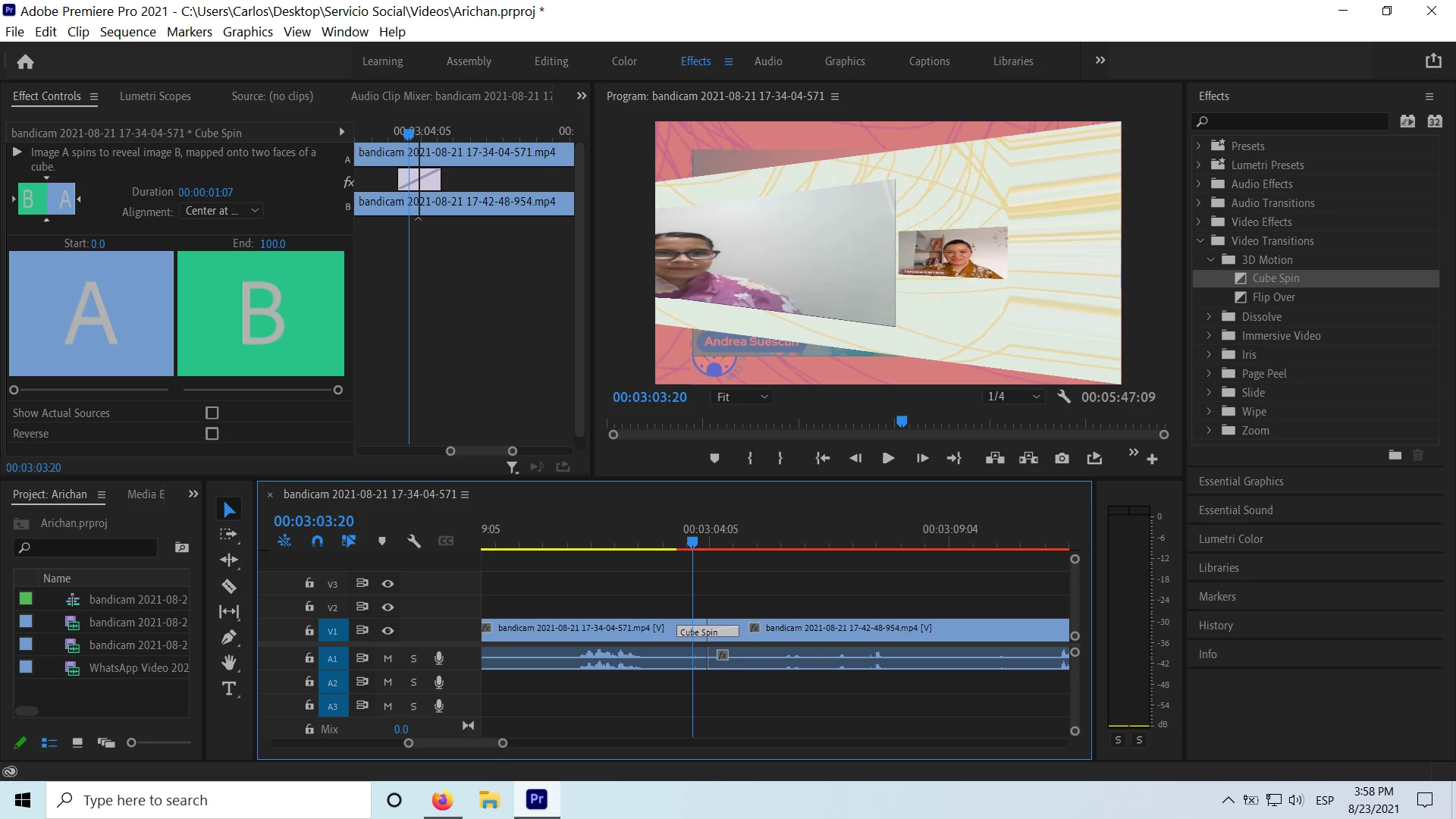


What could be wrong? I have tried looking in the forums but have not found the solution. Any help will be very much welcome.

This topic has been closed for replies.
Correct answer Hyperhelium

Thank you @Richard M Knight , I think it definitely had to do with framerates. After your comment I noticed I was working with some weird framerates and I changed the sequence to a preset editing mode (HDTV 1080p) and that did the trick. Now my transition is working properly.


Thanks a lot!

3 replies

Inspiring
August 24, 2021

Hi, as someone said already don't forget to render your effects. When there is a red bar, usualy you need to do a render. 

If it doesn't work, it's possible that your computer is not powerful enough to handle that type of effect. What are your PC specs ? Are you using a laptop or a PC ?


G.
Inspiring
August 24, 2021

Yes, thank you! @Peru Bob mentioned I had to render and I did what he suggested (pressing "enter" so that it rendered and turned green) but that did not work. I am working with an Asus ROG Laptop with an i7 Intel Processor and an Nvidia GTX960M not the best rig but the effect works correctly with other projects.


Peru Bob
Community Expert
Community Expert
August 24, 2021
quote

 but the effect works correctly with other projects.


By @Hyperhelium


After deleting the Media Cache and Media Cache files:
https://community.adobe.com/t5/premiere-pro/faq-how-to-clear-your-media-cache-in-30-seconds-in-premiere-pro-2020/m-p/11017257/thread-id/260446?page=1
 try creating a new project and import the old one into it.

Community Expert
August 24, 2021

Does the same thing happen with non Bandicam footage? Could be a variable frame rate issue.

Inspiring
August 24, 2021

I will try and get back to you on that. Thanks!

Peru Bob
Community Expert
Community Expert
August 23, 2021

Press Enter to render the timeline and turn the red line to green.

Inspiring
August 23, 2021

Thanks. I've done it. It's green now but it behaves exactly the same.