
Participating Frequently
December 9, 2018
Question

Skipping frames with panning video sideaways after export

  • December 9, 2018
  • 3 replies
  • 1069 views

Hello,

after exporting my project the sideways panning parts seems to skip frames.
What can this be?

https://drive.google.com/open?id=1JZLU-XbeETF_U0Osq-1lK-pMSPL1Piue

i.m recording in 8 bit 50 fps
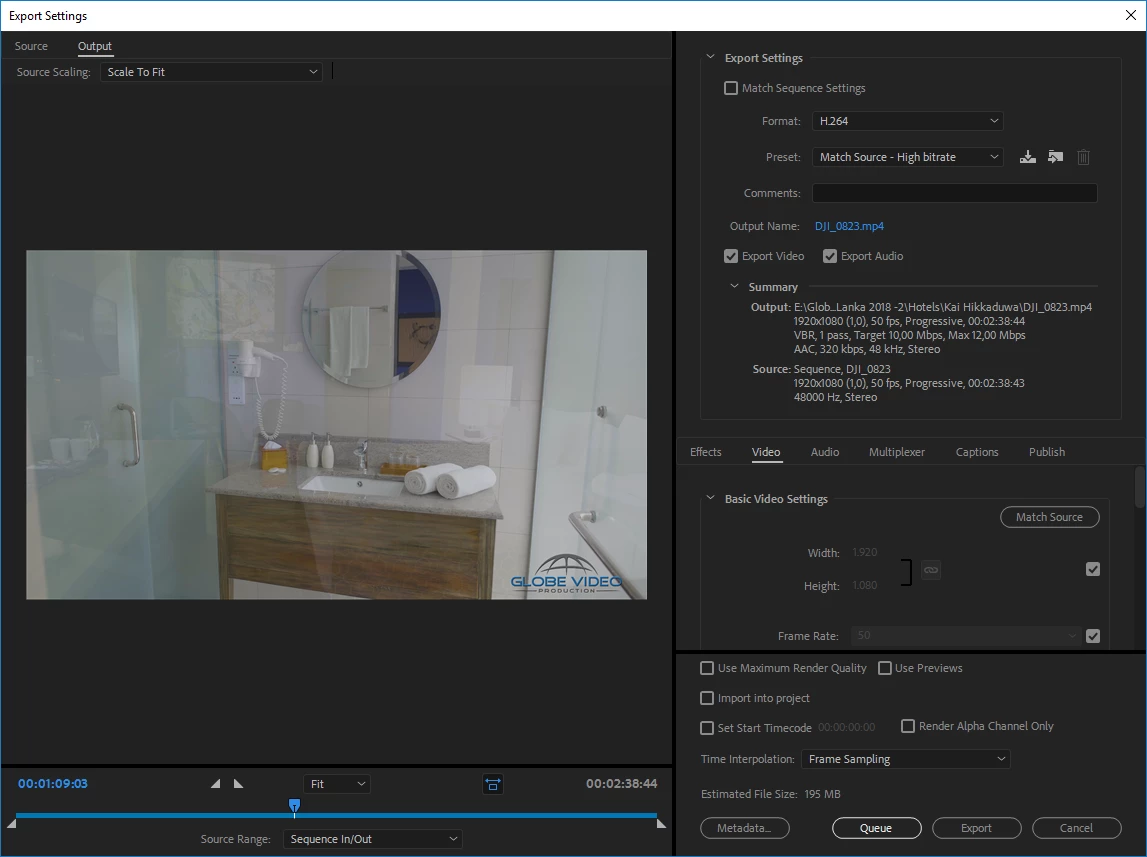
Please someone help me?

[personal info deleted, forum policy]

Cheers Seb

    This topic has been closed for replies.

    3 replies

    Richard van den Boogaard
    Community Expert
    Community Expert
    December 13, 2018

    I don't know for sure, but you may consider trying 1-pass encoding at a higher bitrate. 50fps in 10-12 Mbit with considerable movement may be the source of your problems.

    Participating Frequently
    December 14, 2018

    Where can i find this?

    I'm recording in 8 bit

    Legend
    December 14, 2018

    OK.

    That things look fine in the Source Monitor tells me that either the sequence or the export settings don't match the specs of the video file itself.  Check that.

    Richard van den Boogaard
    Community Expert
    Community Expert
    December 11, 2018

    I noticed that the source footage was shot at 50 frames per second. Is this intentional? For normal speed playback, you typically choose 25 fps in Europe. Only if you wish to use the footage in slow motion (i.e. tell Premiere Pro to interpret 50p footage as 25p, thus half-speed playback), would you choose to shoot in a higher framerate.

    But the most likely source of you troubles may have to do with whatever your DJI chooses as shutter speed. The higher the shutter speed, the more likely movement (e.g. your pans) will appear choppy. A general rule for normal movement is that your shutter speed is kept to 2x the framerate: for 25fps this means 1/50th shutter and 50fps 1/100th. In order to compensate the amount of incoming light, cameras set to automatic modes will go for higher shutter speeds, such as 1/250th or even 1/1000th. This typically results in video-like footage.

    Instead of using shutter speed as a way to change the incoming light, it's much better to use your aperture (which affects the depth of field) or putting sunglasses in front of the sensor. The latter is called Neutral Density or ND filters. Poor quality ND filters may result in unwanted color shifts, though, so it's good to test them out before use.

    Hope this helps.

    Participating Frequently
    December 13, 2018

    its not the drone shots that are the problem but the dslr (GH5s).

    it is set at 180 for the shutterspeed.
    But its only after export, not before.

    If i use hightest quality render quality checkbox in the export settings its fine but it takes soo long.

    There must be another way.

    i'll keep on trying

    THNX

    Legend
    December 13, 2018

    But its only after export, not before.

    So in the Source Monitor, the clips look fine?

    Legend
    December 9, 2018

    That is a camera pan?  Not done in post?

    Participating Frequently
    December 10, 2018

    Hi Jim,

    Yes panning using a gimball.

    Any idea?

    Legend
    December 11, 2018

    OK.

    How's the clip look in the Source Monitor?