Inspiring
June 25, 2016
Answered

Slog2,3 Luts, Most Luts missing from Priemiere 10.3

  • June 25, 2016
  • 3 replies
  • 18094 views

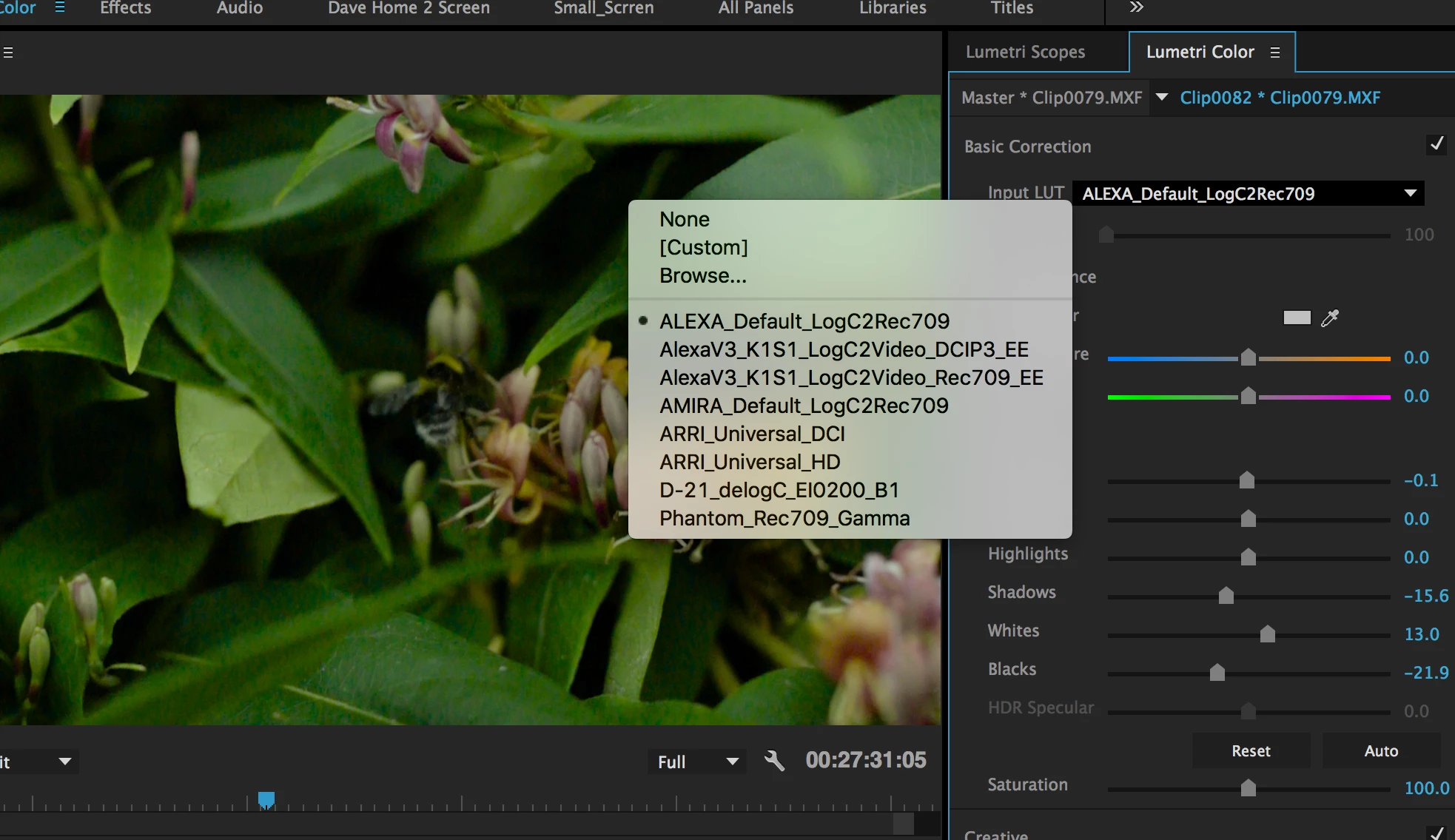
Where have all the LUTs gone in Priemiere 10.3 for Lumetri Color?

This topic has been closed for replies.
Correct answer Ann Bens

FAQ: How to go back from Premiere Pro 2015.3 to Premiere Pro 2015.2

Or put this Technical folder  https://db.tt/DWTgZYJf   in LUT's folder in Premiere's root (program flles/adobe/.../LUTs

[post edited, now contains correct download link]

3 replies

CipiatoneAuthor
Inspiring
June 27, 2016

Thanks Guys, so I have found the old LUTS including Slog 2 and 3 in the legacy folder within the root folder of Premier:

Right click the Premiere App and go to show package contents.

file:///Applications/Adobe%20Premiere%20Pro%20CC%202015.3/Adobe%20Premiere%20Pro%20CC%202015.app/Contents/Lumetri/LUTs/Legacy/

I copied them into the Technical folder next to the Legacy folder and they all now load in Premiere.

Thanks.

arlen figgis
Participant
June 27, 2016

Great yes i stumbled across them too!!

Also this may be useful:

I tried putting my 3rd party Impulz luts in the 'Creative' folder (and took out some of the Lumetri ones i never use) and now i can scroll thru them all in the Lumetri creative Lut tester (like you do with the native ones)...rather than having to point the lut drop down to choose 3rd party luts...

Participating Frequently
June 26, 2016

Hey - tried al these and ONA MAC - i still cannot get the cuts to show up in the Lumetri TECHNICAL or CREATIVE panel.  Common guys this is basic stuff - and with all the confusion in the Market with 3rd partisan us users we dontneedmoreLUT confusion.

Thank you.

Ann Bens
Community Expert
Community Expert
June 25, 2016

Half of mine are missing too.

You can import them from the 2015.2 version.

Participant
June 26, 2016

How do you install that version?

Ann Bens
Community Expert
Ann BensCommunity ExpertCorrect answer
Community Expert
June 26, 2016

FAQ: How to go back from Premiere Pro 2015.3 to Premiere Pro 2015.2

Or put this Technical folder  https://db.tt/DWTgZYJf   in LUT's folder in Premiere's root (program flles/adobe/.../LUTs

[post edited, now contains correct download link]