Arrrrgh
Inspiring
February 6, 2017
Answered

▶Slow Constant Zoom Impossible - Keyframes◀

  • February 6, 2017
  • 3 replies
  • 7897 views

Hey guys and gals.

I have an image which I want to key frame with scale.

Start is at 100% scale and the End is at 4% scale.

It doesn't matter if the sequence is 30 seconds, 1 min or 10 mins the speed of the zoom isn't consistent which is what you'd expect when you have only two keyframes! The zoom will be nice a slow for the first 80% of the clip then the last 20% it speeds up dramatically to get to the 4%.

No other settings are on the clip.

I just want it to be a constant speed from start to finish.

Any help appreciated : )
    This topic has been closed for replies.
    Correct answer SAFEHARBOR11

    3 replies

    Participant
    November 2, 2020

    I am having the same issue. I simply want to zoom out of a photo in premiere but as the orignal poster described the zoom out speed will be constant for about the first 80%, then it abruplty speeds up towards the end. I have made sure both keyframes are set to Linear. This is so furstrating. Any help will be appreciated. 

    Ann Bens
    Community Expert
    Community Expert
    November 2, 2020

    Both temporal and spacial need to be Linear.

    Participant
    June 19, 2020

    I know this is from a long time ago but I have the same problem and I did what the answer told me to do, right click the keyframes and put them on linear but it still speeds up and nothing has changed. There is not a single other forum about this so could you please help?

    Participant
    September 14, 2020

    I'm having a similar problem.  My two keyframes are in linear, and at the beginning of the shot the zoom speed seems consistant, but then slows to a crawl for the last quarter of the shot or so.  I am not using ease in or ease out, but it's still having this issue. Any help would be much appreciated! 


    Ann Bens
    Community Expert
    Community Expert
    September 14, 2020

    Thanks Ann Bens for reaching out!!!  Yes, all the keyframes are on linear and ease in is not on.  If you have a moment, check out the link below with two test zooms. Each zoom has a hard stop, which demonstrates there's no "ease in" on.  And I know it's a little subtle, but you can see that the zoom starts relatively fast and then slows after a few seconds.  Any thoughts you have would be appreciated.  God bless!

    https://youtu.be/lo9nL1wz2xA


    I cannot reproduce your issue.

    Post screenshot of just the path in the Program monitor.


    On a side note if you do use ease in and out.

    First keyframe is Ease out, last keyframe is ease in.

    If you want a slow movement you expand the length of the image and set keyframes wider apart.

    Participating Frequently
    February 6, 2017

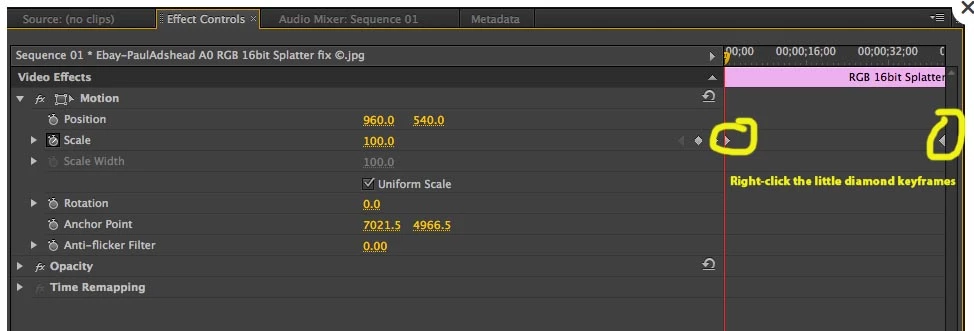
    Right-click actual keyframes (right side of your screen shot) and choose Linear rather than Bezier, which is a curve, for Spatial and Temporal Interpolation. See if that helps

    Thanks

    Jeff

    Arrrrgh
    ArrrrghAuthor
    Inspiring
    February 6, 2017

    Thanks for your reply Jeff! Im struggling to find where you mean?

    What you say makes a lot of sense so I'm hopeful. : )

    SAFEHARBOR11Correct answer
    Participating Frequently
    February 6, 2017