
Inspiring
September 6, 2021
Answered

Source Monitor Glitch after update

  • September 6, 2021
  • 4 replies
  • 1732 views

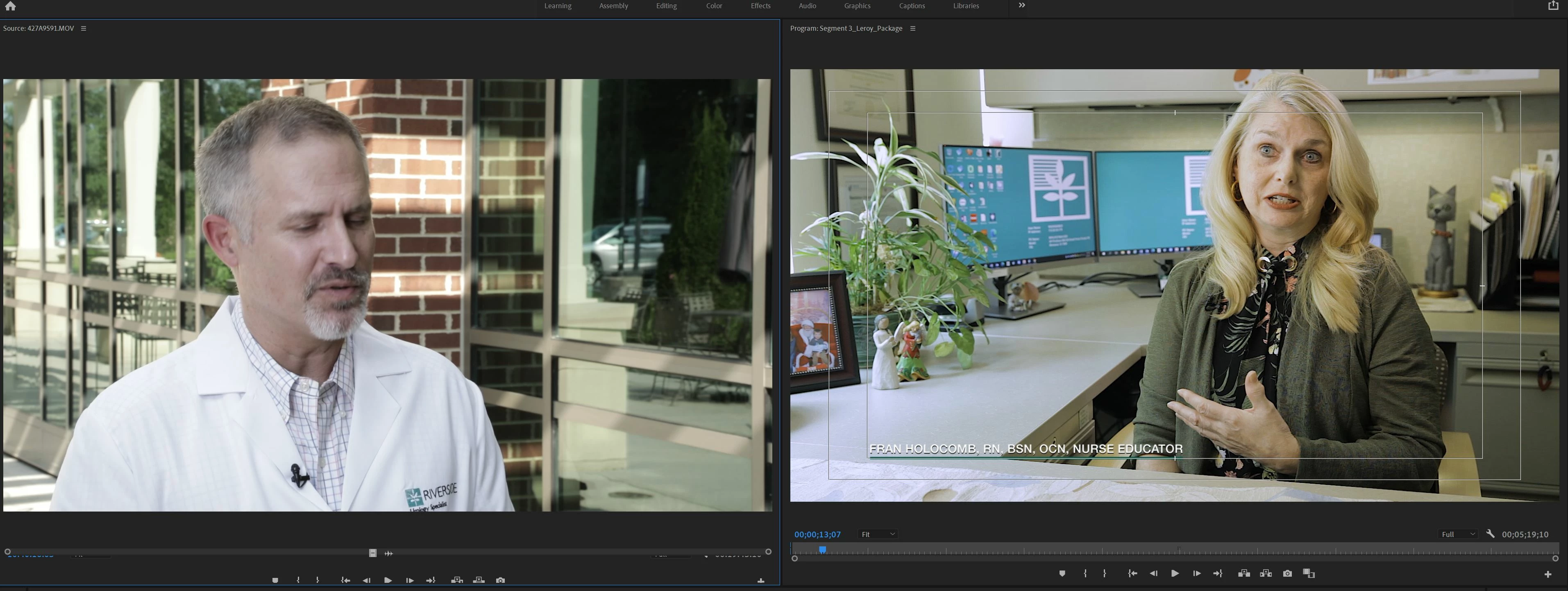
Hello, I did the most recient update 15.4.1and now my source monitor as lost the bottom scroll bar. If you look at the record monitor it is still there but its gone on the source monitor.  I tried right clicking, I tried to roll with my mouse. Nothing is working! I cannot mark in and out OR scroll through my source footage except in the bin which is a pain. Can anyone help PLEASE? I am delivering a half hour show tomorrow and this is slowing me WAY down! Thank you!. 
This topic has been closed for replies.
Correct answer Ann Bens

Known issue: Close panel and open from timeline or project window by double clicking on a clip.

4 replies

Matt Young14394008
Legend
January 23, 2023

This is happening to me now after the most recent update to 23.1.0.  Closing the panel and then double clicking a clip in the timeline gets it back, but it's happening annoyingly often.

Stan Jones
Community Expert
Community Expert
January 23, 2023

Matt,


Any idea what creates the problem? I'm not getting it.


Win10


Stan


Matt Young14394008
Legend
January 23, 2023

I haven't been able to narrow it down to any particular set of actions...but I *think* I can say that I've noticed it upon starting Premiere, and I've noticed it happen after having been working inside Premiere for quite a while.  I'm regularly switching workspaces, so maybe it's happening after some particular sequence of events with changing layout?  I'll try to keep a close eye and report.

Kartika Rawat
Community Manager
Community Manager
September 7, 2021

Hi KimagesImages!

Sorry for the trouble. Let us know if our expert's suggestions help.


Happy to assist.

Thanks,

Kartika


Participant
February 23, 2022

I'm having this same issue. Closing the panel and double-clicking on a clip isn't fixing it. The playhead/scroll bar is hidden by the timeline "resize" bar. Resizing the window isn't fixing it either. Screenshot attached.

Ann Bens
Community Expert
Ann BensCommunity ExpertCorrect answer
Community Expert
September 6, 2021

Known issue: Close panel and open from timeline or project window by double clicking on a clip.

Inspiring
September 7, 2021

worked GREAT! Thank you for getting back to me so quickly!

Averdahl
Community Expert
Community Expert
September 6, 2021

Sometime screen redraw issues like this can be solved to drag the panel with the mouse, making it higher or wider.


If it does not solve the issue, close Premiere Pro and: FAQ: How to reset (trash) preferences in Premiere


Report back your findings. 🙂