
Exit
  • Global community
    • Language:
      • Deutsch
      • English
      • Español
      • Français
      • Português
  • 日本語コミュニティ
  • 한국 커뮤니티
0

Source patching bugs?

Participant ,
Jun 20, 2022 Jun 20, 2022

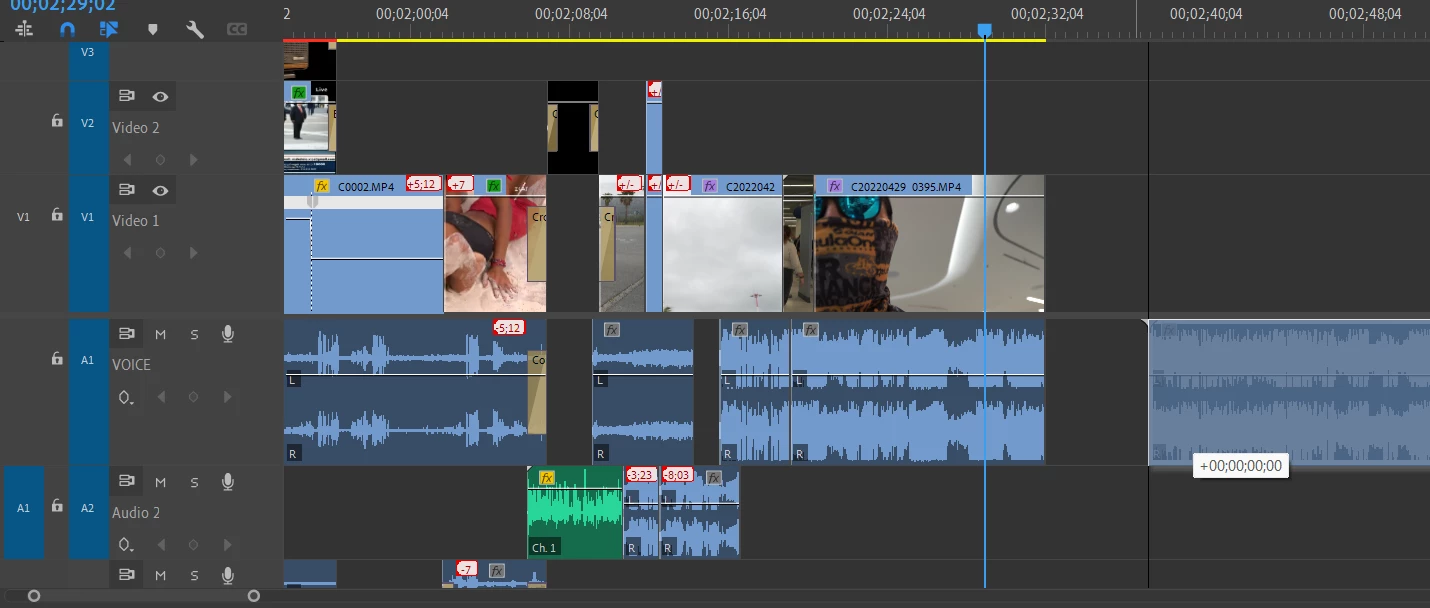
Source patching. All Video tracks are blue but it does not paste the video, only the audio A1 (the last clip on the timeline in the photo). I really wish Adobe would make this drag and drop procedure more easy and productive, I miss Vegas on this one. Thoughts?
Cobra_0-1655742706415.png


TOPICS
How to
161
Translate
Report
Community guidelines
Be kind and respectful, give credit to the original source of content, and search for duplicates before posting. Learn more
community guidelines
Community Expert ,
Jun 20, 2022 Jun 20, 2022

You're almost there!


Click on "V1" in the Source Patching and it should work as expected.

WarrenHeaton_0-1655743373547.png


More info here: Source patching and track targeting


Translate
Report
Community guidelines
Be kind and respectful, give credit to the original source of content, and search for duplicates before posting. Learn more
community guidelines
LEGEND ,
Jun 20, 2022 Jun 20, 2022
LATEST

You have the TRACK targets set ... the right-side group ... which are for working on things already on the timeline.


You only have audio SOURCE targets set. Those are the left-side blue blocks in the audio section. You need video tracks selected above them.


Neil

Translate
Report
Community guidelines
Be kind and respectful, give credit to the original source of content, and search for duplicates before posting. Learn more
community guidelines