
Participating Frequently
March 27, 2020
Question

Still image color distortion

  • March 27, 2020
  • 12 replies
  • 8052 views

When i import an image to Premiere Pro CC the colors get distorted, mainly the highligt and shadow areas. I capture my photos in RAW and then i edit them in Camera Raw (Photoshop). I save the photos as jpeg's and then import them into a project in Premiere Pro. When i do that this happends (SEE PICTURE). Exporting the file dosen't help either, the problem remains.


What is this ?!?!
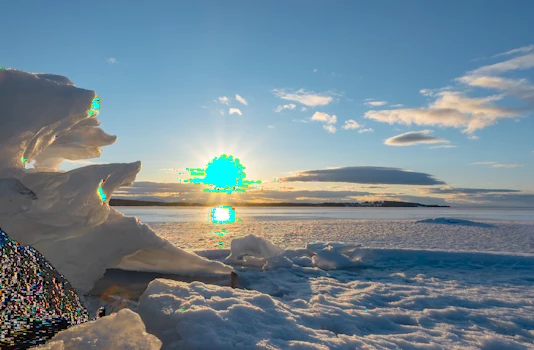
 

This topic has been closed for replies.

12 replies

Inspiring
March 27, 2020

shooting straight into the sun is hard to do and get good tonality.

You got a couple things going on to figure out...

1) settings you should use for your camera raw files 

2) settings you should use for photoshop 'monitor' color space when saving the raw as jpg

3) settings to use in color correction in PPro ( luma value of white point )


good luck !

🙂


Inspiring
March 28, 2020

that image you posted is doomed. I put it into resolve and played around... but the blue and pixelation around sun etc. is baked into image and is doomed.... nothing can fix that.


😞


R Neil Haugen
Legend
March 27, 2020

That's typically something out of gamut.


Are you saving the images as sRGB files?


Neil

Everyone's mileage always varies ...
Participating Frequently
March 27, 2020

Saving the files as sRGB didn't solve the problem. Here's a screenshot of the settings i tried recently.

Participating Frequently
March 27, 2020

Using "Gray Gamma 1.8" or "Gray Gamma 2.2" makes the image black & white but solves the color distortion problem.