
Participant
August 10, 2012
Answered

Strange audio problem in Premiere Pro CS6

  • August 10, 2012
  • 3 replies
  • 21182 views

Hi

I have encountered a very strange problem. I am editing a documentary film in Premiere Pro. All material has been shot on the Sony FS 100 camera - imported into PP with the Media Browser. In one interview the last part of a clip has corrupted audio. At one point on the timeline the audio stops playing, and it sounds like a scratch on a vinyl record - two words repeating themselves to the end of the clip (See screenshot of timeline). The images are as they should. When I open the Avchd source clip in VLC the audio is working. When i Import the clip into Final Cut 7 using Log and Transfer the audio is working. My only other option would be that there is a software problem with Premiere Pro CS6. Any ideas of how to fix this issue?
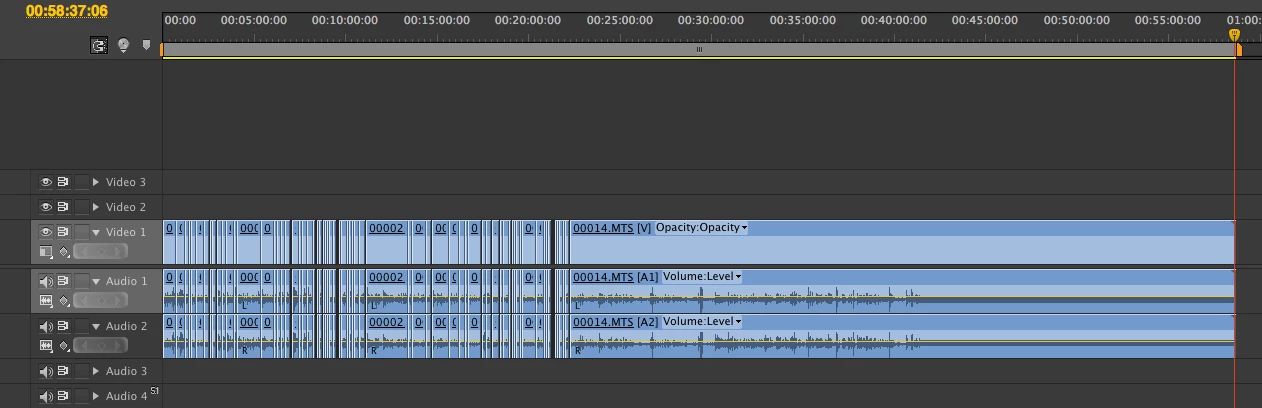
Version PP: 6.0.1

Source footage: MPEG-4 AVCHD (1080/25p - Sony FS100)

Version mac: OS x 10.8

Model Name:     Mac Pro Mid 2010

Processor Name:     Quad-Core Intel Xeon

Processor Speed:     2.4 GHz

Number Of Processors:     2

Total Number Of Cores:     8

Memory: 20 GB

Graphics Card: NVIDIA GeForce 570 GTX

Third-party I/O: Matrox MXO2 with Max

Mercury Playback Engine: Software mode

This topic has been closed for replies.
Correct answer the_wine_snob

One similar, potential problem, that can develop, is when the Conforming process is interrupted, before it completes 100%.

A quick way to rule that out, would be to navigate to the Media Cache files, and Delete the CFA and PEK (Waveform Display) for that Clip, outside of Premiere Pro. Then, when you launch PrPro and Open your Project, the program will recreate both of those files. There is a little progress bar, that many do not notice. Let it complete 100%, before even touching the computer. Test.

I hope that it is as simple as that.

Good luck,

Hunt

3 replies

Participant
September 16, 2016

had a weird problem with adobe premiere cs6 with the audio / sound of my file after importing. at the middle of the clip, the audiotrack began from start while the video ran on normally. this solution worked great for me: deleted the contents of the folders in C:\Users\[Username]\AppData\Roaming\Adobe\Common (under win 10) and re-imported my file. this time i waited for the little "conforming"-bar in the lower right corner and everything works fine. thanks!

ronaldogom
Participant
February 26, 2016

February, 2016... Premiere CC Cloud last version and this odd reapered when I use DV25 Quicktime...

the_wine_snob
the_wine_snobCorrect answer
Inspiring
August 10, 2012

One similar, potential problem, that can develop, is when the Conforming process is interrupted, before it completes 100%.

A quick way to rule that out, would be to navigate to the Media Cache files, and Delete the CFA and PEK (Waveform Display) for that Clip, outside of Premiere Pro. Then, when you launch PrPro and Open your Project, the program will recreate both of those files. There is a little progress bar, that many do not notice. Let it complete 100%, before even touching the computer. Test.

I hope that it is as simple as that.

Good luck,

Hunt

Participant
August 10, 2012

Thank you very much Hunt, you were spot on! 

the_wine_snob
Inspiring
August 10, 2012

Great news!

Thanks for reporting your success. Now, you can mark your question as "Answered."

Good luck,

Hunt