Known Participant
January 28, 2022
Question

Strange clip icons in timeline

  • January 28, 2022
  • 2 replies
  • 587 views

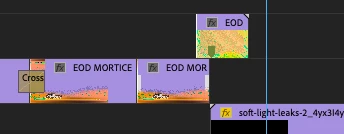
I've just started seeing this in Premiere Pro 2020- Some clips show as a string of vertical bars, grainy fuzz or other weirdness, rather than the usual solid: 
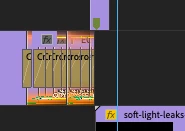
 

Minimizing then maximizing, or shifting them up one track and back fixes it, but as soon as I scroll the timeline they break up again. It's only an annoyance right now but I'd love to get rid of it!

This topic has been closed for replies.

2 replies

Kartika Rawat
Community Manager
Community Manager
January 29, 2022

Hi there!

Thanks for reaching out. Have you tried resetting preferences? https://community.adobe.com/t5/premiere-pro-discussions/faq-how-to-reset-trash-preferences-in-premiere-pro/td-p/8236158

Let us know.


Kartika

MdBirdAuthor
Known Participant
February 4, 2022

Hi- Thanks for the tip- I reset prefs, but no dice. I'm pretty sure it's not a graphics card issue (iMac Retina 5K, 27-inch, 2019  Radeon Pro 575X 4 GB) as the OS is up to date and the issue came on rather suddenly (no updates to OS or Premiere 14.4) and doesn't appear with Premiere 22.1.2.  At this point it's just an annoying mystery 🙂

Ann Bens
Community Expert
Community Expert
January 28, 2022

I am guessing this is a graphics card issue: update driver (from manufacturer).