
Answered
Stretch 4:3 video back to 16:9
Now before you say "streaching 4:3 to 16:9 is bad, don't do it", I recently downloaded some footage that was orinigally 1920x1080 16:9, but was squeezed in to 1440x1080 4:3. How can I stretch it back to 16:9?

Now before you say "streaching 4:3 to 16:9 is bad, don't do it", I recently downloaded some footage that was orinigally 1920x1080 16:9, but was squeezed in to 1440x1080 4:3. How can I stretch it back to 16:9?
Menu Seqeunce item, "Sequence Settings".
Neil
So you'll need to figure out a workflow first. Will you be mixing this clip with other footage that is actually 16:9, and 1920x1080 resolution?
If so, then you should be working in a 1920x1080 sequence, with 1.0 Pixel Aspect Ratio.
If only working with the 1440x1080 footage, then you can work in a 1440x1080 sequence, and still output as 1920x1080 when done editing (sequence footage will have 1.333 PAR, while export will have 1.0 PAR). This is how we used to work with HDV footage from tape, which was 1440x1080 with 1.333 PAR.
NOTE: 1440 x 1.333 = 1920. Isn't that neat?!
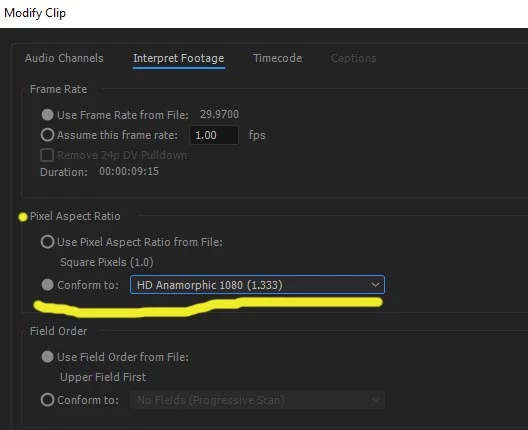
In either case, right-click a clip in the Project Bin and select Modify > Interpret Footage option. If pixel aspect is not 1.333, then manually set PAR to 1.333 and that should restore the image to 16:9 widescreen, either in the 1440x1080 sequence or a 1920x1080 sequence, your choice.
Already have an account? Login
Enter your E-mail address. We'll send you an e-mail with instructions to reset your password.
 AdChoices