
Blobber
Participating Frequently
November 18, 2017
Answered

Stroke creates spikes on letters

  • November 18, 2017
  • 1 reply
  • 4705 views

Hey

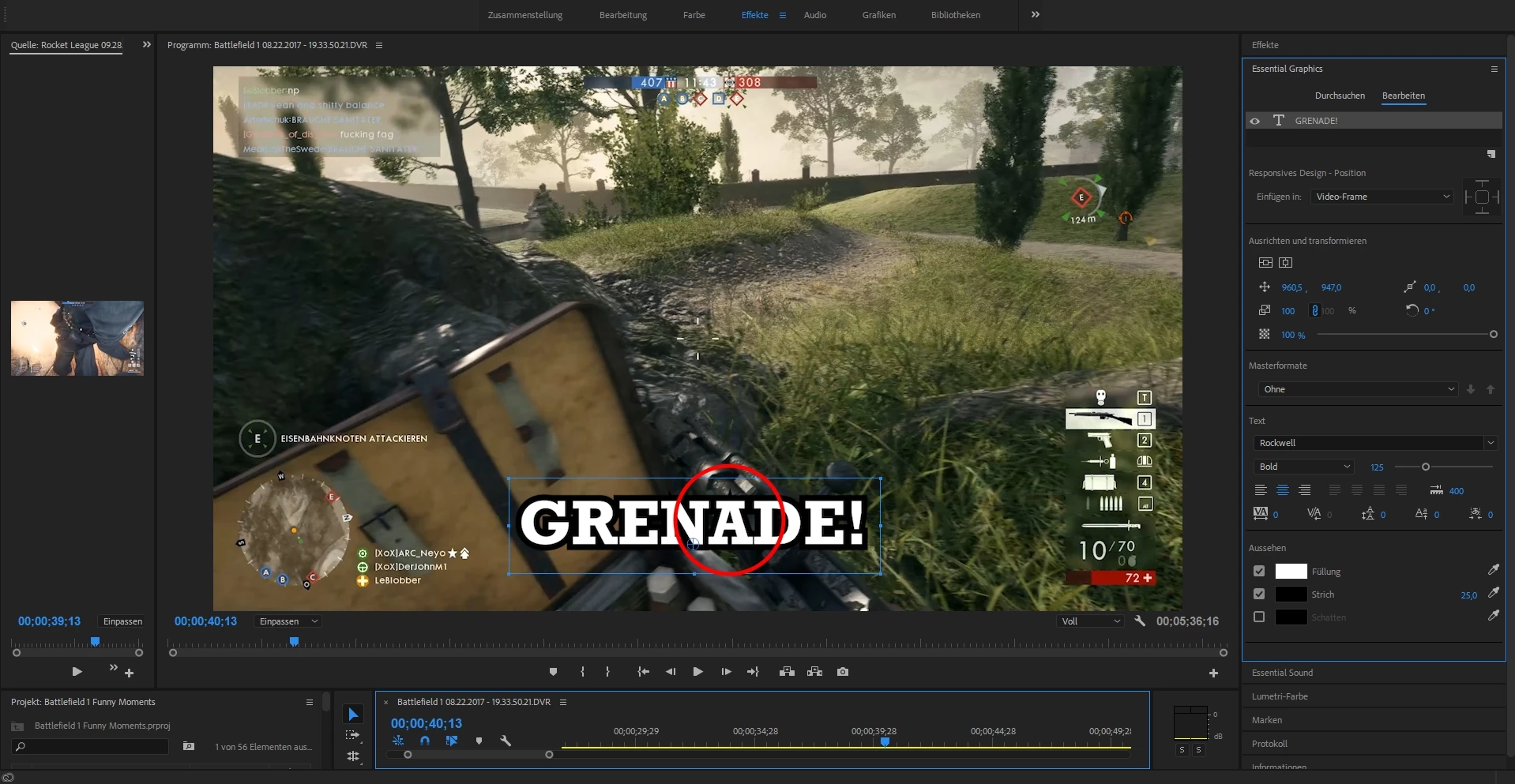
I have a problem with the Essential Graphics tab.

Every time when I add a text and try to outline it, it creates a spike on some letters.

I have seen a solution, where you have to change the miter limit in the strokes panel, but it was from 2011 and i can't find the stroke options anymore.

Is there another solution ?

I am thankful for every help
This topic has been closed for replies.
Correct answer Ann Bens

My overlay is in german


OK, all I can say is trash preferences, see if that will help.

1 reply

Community Expert
November 18, 2017

If the tutorial you saw was from 2011 then it was in the old text engine. That text engine can be found by going to file/new/legacy title.

Blobber
BlobberAuthor
Participating Frequently
November 18, 2017

I know, I always use the new Text tool but if I want to add a stroke to the text, letters like A get a spike but I don't know how to get it away or how to open the stroke panel in CC 2018, if it even still exists

Ann Bens
Community Expert
Community Expert
November 18, 2017

Well on most of them. In my latest projects I used Rockwell bold and put a 25 stroke on it.


25 might be a bit too much.

Please post screenshot.