
Participant
December 19, 2021
解決済み

sudden change in import, a single 5.1 audio track now is 6 mono tracks

  • December 19, 2021
  • 返信数 1.
  • 603 ビュー

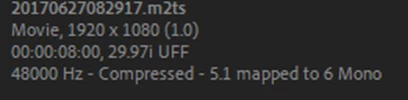
In v 2019 & 2020 etc.  I import my AVCHD files, they show up as m2ts with 5.1 compressed audio track. I can create a sequence with a 5.1 audio track.  Today, for some reason, the same CC version, and I tried the newest version as well, the same AVCHD file imports as an m2ts file and says 5.1 mapped to 6 mono tracks instead of the one 5.1 track.  I do not want this and I cannot figure out how to get it back ... any thoughts. 


PC Window 10,  i7 3.4 Ghz, 24 GB Ram, 

CC v 2021 and 2022 

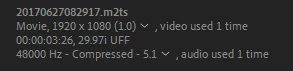
This is the old import that I want
this is what is looks like now, 


このトピックへの返信は締め切られました。
解決に役立った回答 Richard M Knight

Have a look at :


https://community.adobe.com/t5/premiere-pro-discussions/audio-line/m-p/12597187#M384425

返信数 1

Community Expert
December 19, 2021
Paulson7作成者
Participant
December 19, 2021

Richard, thank you so much. I searched and searched and did not see that thread so thanks for the link.  This fixes the problem on a file by file basis after the clips have been imported, but I import hundreds of clips for a typical project and do not want to manually make the chage to each file. I've looked in the usual settings, project settings, sequence settings, preferences and would like to have it go back to what it has always done, import my clip with a single 5.1 audio track instead of converting it to six mono tracks.  Any idea on how to get this previous default setting back?

Paulson7作成者
Participant
December 19, 2021

Ok, I figured out that you can select all the clips in the project window, then go to clip - modify - audio channels as described in the link above, and it will make the change to all the selected clips. great. still doesn't explain to me why  it changed in the fist place, but at least I can get back to work.  thanks again Richard and all the folks that provide guidance to us non professional editors.