
Inspiring
April 21, 2019
Question

Suddenly Blur Effect isn't Working

  • April 21, 2019
  • 1 reply
  • 5482 views

Suddenly I'm finding lot of instances where the blur effect is no longer working. It's like the effect remains blurry despite it being keyed out. This is an elaborate project that I've been working on for a few months. So, this is very frustrating. I'm having to go in and remove the blur effect and reapply it.

See in this image where the effect is keyed out but the preview is still blurry. I didn't catch this until after the project was rendered and uploaded.
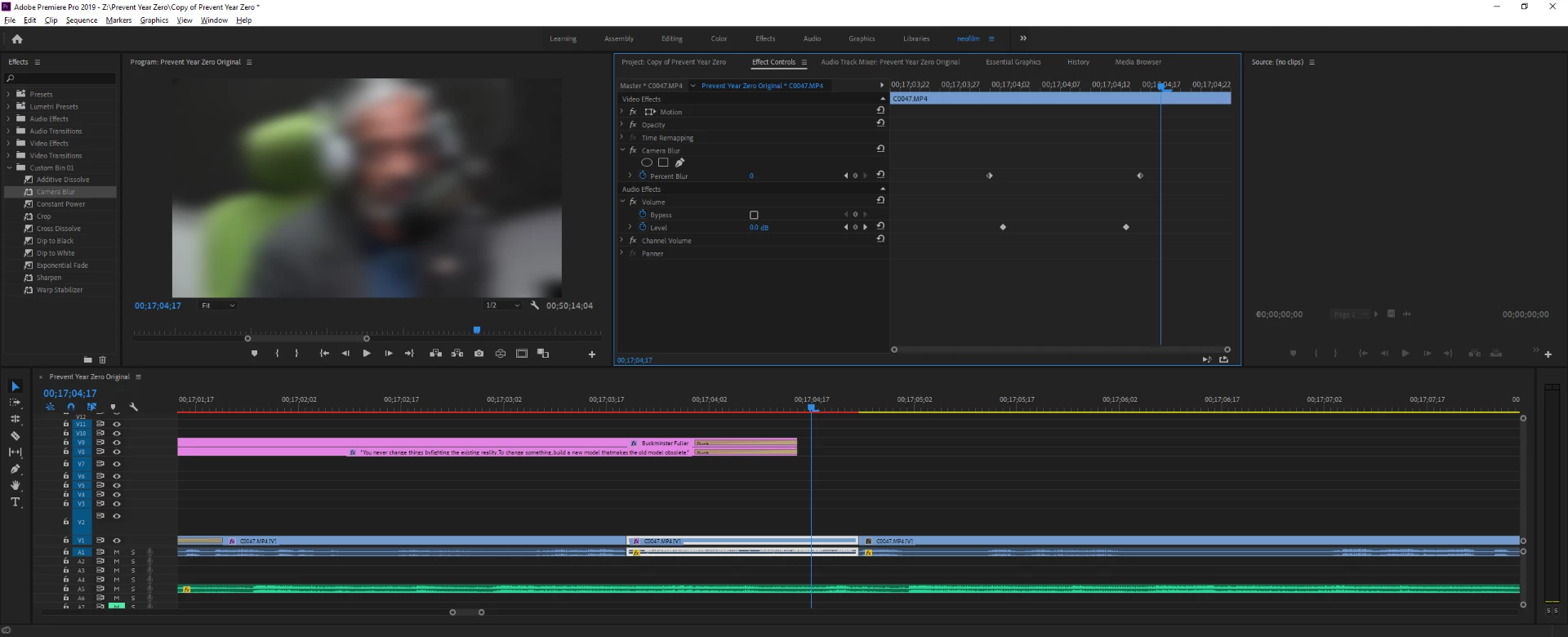
It's unbelievable how many problems I've been having with Adobe Premiere of the last 6 months. I even have a new build that is super top shelf and still problems. It's like every day something new. First it was a night mare with fonts not synching and not updating, then it was various warnings causing the program to lock up. And now this? What in the hell????

    This topic has been closed for replies.

    1 reply

    R Neil Haugen
    Legend
    April 22, 2019

    Seeing that red bar above that section ... did you try Render and Replace for that area?

    Neil

    Everyone's mileage always varies ...
    NeofilmAuthor
    Inspiring
    April 22, 2019
    • I've never "had to" render an area because blur didn't work or any effect for that matter, in the timeline or final render.
    • I've only heard of render and replace for audio. I've pre-rendered areas before to make them play back smoother. But, whether I did either of these things never mattered for the final product.
    • After redoing all the blur effects the red bar is still there but it all works fine now in the timeline and final render/product.
    • When I added the new blur it was fine. It plays fine on timeline without pre-rendering and the final product is fine. I'm not fine though because this is insanity.

    My build, i9 9900k, 2080Ti, 64 GB Ram, SSD's this just should not be happening, or, wait, I have gone insane, maybe it should because it is adobe.

    NeofilmAuthor
    Inspiring
    April 22, 2019

    The red bar will stay as Camera Blur is a non gpu effect.

    Might want to use Gaussian Blur?


    So, adobe premiere has effects that I shouldn't use all of the sudden? Great, is there a magical list somewhere of effects not to use? It's never been a problem before to use non gpu effects, even on my first gen i7 and this is a current cpu I'm using is ten years newer! Plus I'm using 64 Gigs of ram instead of 16. And all SSD's. Adobe premiere needs resolve, not avoidance. I appreciate the suggestion, I suppose I can try that from now on. But, for the moment I've already redone all the blurs and it's working fine for now. If I have to redo it again I'll try Gaussian Blur. But, really, this shouldn't be happening. I should be able to use camera blur.