


Participant
January 5, 2022
Question

Superslow rendering after upgrade/all of a sudden

  • January 5, 2022
  • 4 replies
  • 1091 views

Hi!
All of a sudden I´m experiencing super slow rendering speeds in Premier Pro 22.1.2. I don´t know weather it´s due to upgrading Premier Pro, moving office space. Specs and Premier Pro settings below.
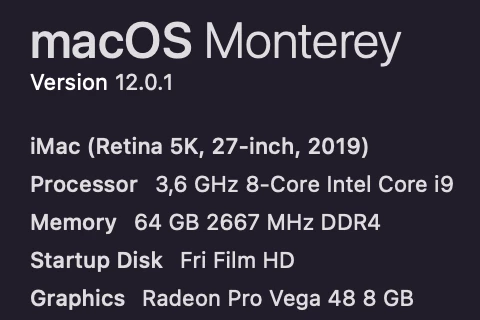
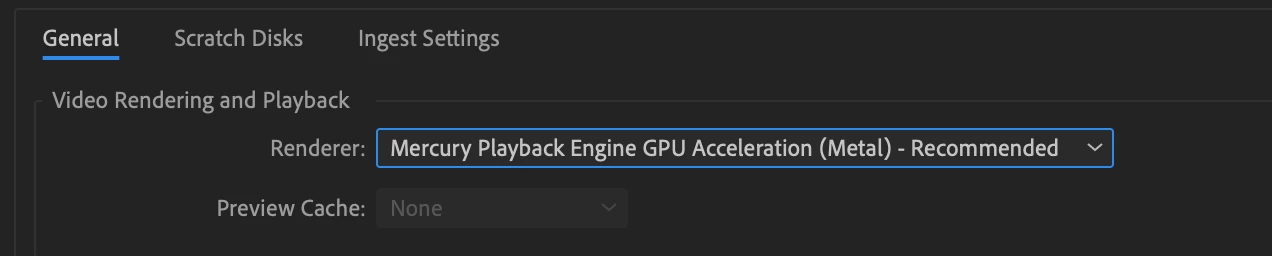
 

Greatful for any clues 🙂

This topic has been closed for replies.

4 replies

Participant
January 8, 2022

Thanks for the input guys! However, after trying to render in Medie Encoder instead of exporting through PP everything started working fine. Even exporting through PP. Which in itself is strange but I don´t have the problem anymore so happy camper.

Legend
January 8, 2022

thanks for posting your fix.   Computers problems are often voodoo.  Walked in to a studio yesterday to consult on a problem that was driving the woman crazy.  Simply approached the workstation and it started working properly.  She was happy the problem was solved but somewhat angry at me...  

Participant
January 8, 2022

🙂 the binary Mesiah, lol. I know what you´re talking about though, I usually get away with a little soft talking to the computer to get things working properly. I guess it was just playing tricks on me this time.

Legend
January 5, 2022

Try reverting to the previous version of premiere that was working properly.   If you deleted the previous version when updating, you can reinstall it using the creative cloud app.  Creative Cloud allows you to have multiple versions of the apps on your computer although they now limit downloads to the current and previous versions...  

Community Expert
January 5, 2022

try to reset the preferences and delete render files from sequence if you are working on a previous project

Kartika Rawat
Community Manager
Community Manager
January 5, 2022

Hi DanyDuarte!

Sorry about the trouble. What type of media files are you rendering (codec/ format, frame rate, frame size)?

Do you have any effects added to the project?


Let us know.

Thanks,

Kartika