
Participant
September 5, 2017
Answered

Sync audio and video - cameras without audio

  • September 5, 2017
  • 1 reply
  • 4718 views

Hey guys,

I'm here because I have a big problem with Adobe Premiere Pro. Recently, I had to learn to use it because of my work. Now I have to make a video; in particular, a conference. I have two cameras and an audio recorded with a Tascam. The problem is that the cameras were muted when we recorded it, and now I have no idea of how to sync everything. Can anybody help me? I would really appreciate it...
This topic has been closed for replies.
Correct answer Richard M Knight

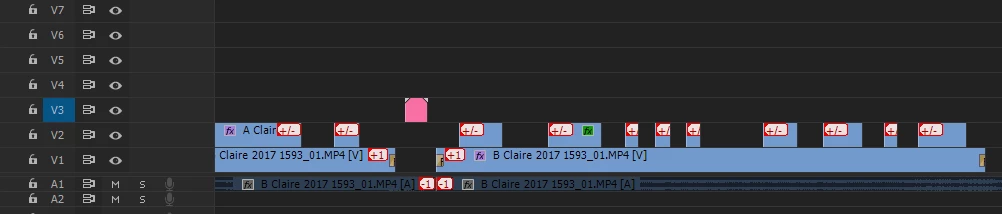
I would sync the two cameras first, often a stills camera flash is a good sync point but you should not have two many problems matching the pictures. I would then sync the sound to the pictures, you will have to do this by eye. I never use the multicamera option in Premiere just put you master wide (if you have one) shot on V1 put the closer shot on V2 and just cut out the sections on V2 that don't work (reframes, out of focus etc.). This is a sample of a dance  show timeline shot with two cameras giving you some idea.

1 reply

Community Expert
September 5, 2017

This is how films were made for the first 70 years or so, that's why they invented the clapper board. You will have to try and find a visual that matches a sound. If the conference speakers were introduced there is a good chance that the compare started the applause, their first clap might give you a sound and a visual. How many sections is the video and sound in? If they are in long sections there is a good chance that the cameras and sound will drift you may have to keep re syncing.

Participant
September 5, 2017

Thank you so much for your answer. The video is aproximately 2 hours long... I guess I will have a lot of problems...

So you think the best option is 1) sync the audio with one camera 2) sync the audio with the other one 3) use multicamera to alternate te images?

Richard M KnightCommunity ExpertCorrect answer
Community Expert
September 5, 2017

I would sync the two cameras first, often a stills camera flash is a good sync point but you should not have two many problems matching the pictures. I would then sync the sound to the pictures, you will have to do this by eye. I never use the multicamera option in Premiere just put you master wide (if you have one) shot on V1 put the closer shot on V2 and just cut out the sections on V2 that don't work (reframes, out of focus etc.). This is a sample of a dance  show timeline shot with two cameras giving you some idea.