
Participating Frequently
September 17, 2021
Question

Sync by audio continues to fail

  • September 17, 2021
  • 8 replies
  • 22317 views


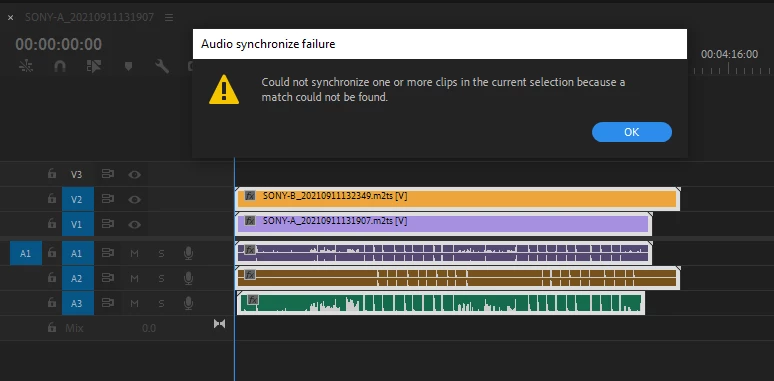
II continue to get this error, when the files clearly should sync. Am I doing something wrong? I think I am doing the same exact steps as I've done when it did work. Syncing clips manually makes have Premiere Pro about worthless - this is a constant in my workflow.
 

8 replies

Participant
August 25, 2025

So I ran into this issue today and was getting the same error message, I can here for answers but it didn't get resolved. I kept playing with it until I realized what the issue was.
For me, I had imported video clips with 8 built-in audio tracks from the camera. I deleted all except track 1 when I was attempting to merge it with the seperate audio recorded from the sound guy. It didn't work! I had to have all 8 tracks on the timeline (this is just how many tracks my cam recorded) then added the boom/lav mics audio tracks underneath it, then boom it all synched! I guess you can't delete default camera audio tracks before syncing in premiere. 

Participant
April 25, 2025

This issue - and this conversation - is driving me insane.

Some people know better, some don't, but being an active paying user of premiere for years I don't need a workaround, I need a solution : the audio sync is broken.

And yes I tested everything.

I pay a high price for things to work, not to troubleshoot, not to rant, not to find excuses for my customers.

It is 3 in the morning in my contry and I'm still synchronizing clips : yeah !!!!
One cam front, one cam on stage, a stereo mic front and the backround music. Litteraly nothing difficult, I can do it by looking for the clap on my waveforms.... But I pay Adobe a premium price to NOT do this very intersting job and I'm certainly NOT intersted in troubleshouting it.
Same sound, 4 different sources, same bitrat, same brand, same clap : come on, what's the problem !
And don't get me starded on your deficient AI : still waiting to have an audio clip properly rendered (so many better free options) and still waiting to just be able to try the extension clip option ("can't render, ask your administrator for credits" : yep, that's me, can't do a thing about it, still waiting a response from Adobe....)
And can we talk about rescaling the windows ? Can we ? Works fine in photoshop, works fine in AE but is just impossible in PP ! How many years do you need to adress this issue !!!!
Un - F - B... !!!
Oh, also, I almost forgot, the mask atomation doesn't work anymore, yeah !!!!

Thank you Adobe, thank you so much.
Take my money and send me straight to the "how to synchronize audio" FAQ. 
It's not you, it's me,

I'm so stupid.
XOXO


R Neil Haugen
Legend
April 25, 2025

I think everyone gets the frustration. Premiere can struggle with audio sync if one source is say 8-10dB or more lower than another, for sure.


But still, I've done that sort of thing many times just with the multicam process, which is built to do that. Some times you need to up-gain a clip first, some times sort out which setting for audio tracking, but ... I've done quite a bit without much trouble.


So how you've been trying might be helpful to know.

Everyone's mileage always varies ...
Participating Frequently
July 12, 2023

Premiere simply does not have the ability to sync audio when they are sufficiently different compression and bitrate.

 Over the past few days, I have spent 6 hours collectively with adobe support regarding this reprehensible audio sync issue. It will not sync audio that is of different qualities (bitrate, compression etc) I have been trying to sync WAV recordings from a ZOOM H6 (96000 Hz - 24-bit – Mono) to scratch audio from a Sony fs5 I 48000 Hz - 24-bit – Mono). It simply does not work.

6 hours of futile customer support. Including a 3-hour phone call. Nothing. They got me to upload the audio files to their server for testing.

And please no “I Am nOt hAviNg tHat IsSuE” comments. You aren’t having that issue because you’re a vlogger who never had to deal with real audio management.

Hundreds of dollars a year for windows movie maker with extra steps


Suffering with Pr since 2011
Community Manager
July 14, 2023

"They got me to upload the audio files to their server for testing." 

I was able to get the files you uploaded, and one was only a few seconds long.  It might be too short for the DSP to work properly, do you have longer examples that I can try?  

R Neil Haugen
Legend
July 19, 2023

There doesn’t need to be further testing. On my end if I go to the EXTREME hassle of exporting both audio clips in the same format, hz rate, etc, then it syncs no problem. But that is NOT a fix given the sheer number of separate clips needing syncing.

That is all the info that YOU, ADOBE need. Your software is just incapable of recognising blatantly identical audio tracks simply due to their differing formats and hz rates. Fix that. The very definition of ‘scratch vs external recorded audio’ is that the quality is different.  Also, while you’re at it, stop focusing on gimmick ai rubbish and clone Plural eyes by red giant... real multi-channel, multi layered audio syncing. You know… something worth paying for. But I guess that doesn’t get hype video influencers to make ticktocks about you?


And R Neil Haugen: no, my clients won’t wait. I just invest in additional software that… drumroll… works. No one waits; just Adobes pro users are flagellated for the sin of need to get work done with software that has had the same issues for 10 years. And it seems some enjoy this paradigm.  


In all seriousness, I totally understand the anger and frustration. The discontinuance of PluralEyes without a good substitute has hammered many people.


Apparently, the multicam of Resolve and Premiere must have been "good enough" for enough people usage of PluralEyes was dropping. Ergo, g'bye.


But "good enough" for many isn't nearly what a lot of others like you ... and me too, realistically ... needed.


I'm glad there's an Adobe audio staffer on this thread. Premiere's multicam and proxy audio options are simply inadequate for many users.


As I noted above, I do try and help others find a way to get the job done even though the program ain't doing what we really need. Often, there are ways that don't add a ton of time but do get the blasted job done. I look for those where any of us can find them.


And feel free to post detailed rants. I've certainly done my share. Just ... do give the details of what screws up that outta not be screwing up.


Neil

Everyone's mileage always varies ...
Inspiring
September 2, 2022

Synchronizing only the audio aside from the video part should work. Then move the videos back to their respective audio tracks since they are the same length. This worked for me.

Legend
September 18, 2021

So sorry the previous suggestion didn't work for you... it does for me. Waiting 15 minutes and no result must be super frustrating.


I don't know what your media is like... it could be that there actually is a slight discrepancy that is enough to throw the algorithm off. Like audio drift? (One device gradually slows down the audio, barely perceptible unless the file is really long.) Or... maybe one mic was very close to a voice and picked it up clearly but the other mic was far enough away that it just didn't pick up... or whatever. If the two audio tracks are "different" enough for PP to not match them... maybe try this:

1. Make a copy of the sequence (just in case)

2. In the sequence copy, trim your two audio tracks back to a very short span where each picked up the same audio clearly (maybe just the clap in the beginning, or a section where a few loud bursts happen). So basically, if your entire sequence was (let's say) 2 minutes long, trim the beginning and ending of each clip to just that span of 15 seconds (let's say) somewhere in the middle where the audio was clearly picked up by both mics.

3. Select both clips and synchronize with audio.

4. After syncing, they're lined up correctly in the timeline, and you can "untrim" them both out to their full length.


I know this works... but I do wonder if after all that it would have been easier to just manually sync the clips. Probably same number of clicks. ?

R Neil Haugen
Legend
September 18, 2021

A2 doesn't show any waveform at the beginning of the clip. Go into that, and set audio gain to max all peaks to maybe -6dB. It will probably work then.


Neil

Everyone's mileage always varies ...
Legend
September 18, 2021

I used to get super irritated by this... and then I discovered that, if I go to the Sequence menu and choose Render Audio first, and then sync with audio, it works. I'm sure there's a technical reason why this is a "feature" and not a "bug". Whatever. Hope it helps.

Participating Frequently
September 18, 2021

Tried rendering first (took 15 minutes), and it still failed. 

Mike Dziennik
Community Expert
Community Expert
September 17, 2021

Are you clips linked? They are all different colours. Does it work if you select just the clip on A1 and A3 for example? Which track are you using in the Synchronize Clips dialog?