
Syncing two clips with different frame rates
Hey folks,
I'm editing footage of a shooter shooting a clay target. I can't get two clips to sync up, and I suspect it has something to do with the different frame rates.
One clip is shot over the shooter's shoulder. It was shot on an iPhone 11 and has a frame rate of 29.97.
The other clip comes from a ShotKam, which is a camera installed on the barrel of the shotgun. It has a frame rate of 33.33. I was told that the footage is shot at 100 fps and plays back at 33 and 1/3rd fps. This clip is in a smaller frame in the corner of the video. The ShotKam footage captures 1.5 seconds in front of the shot and 1.5 seconds after the shot.
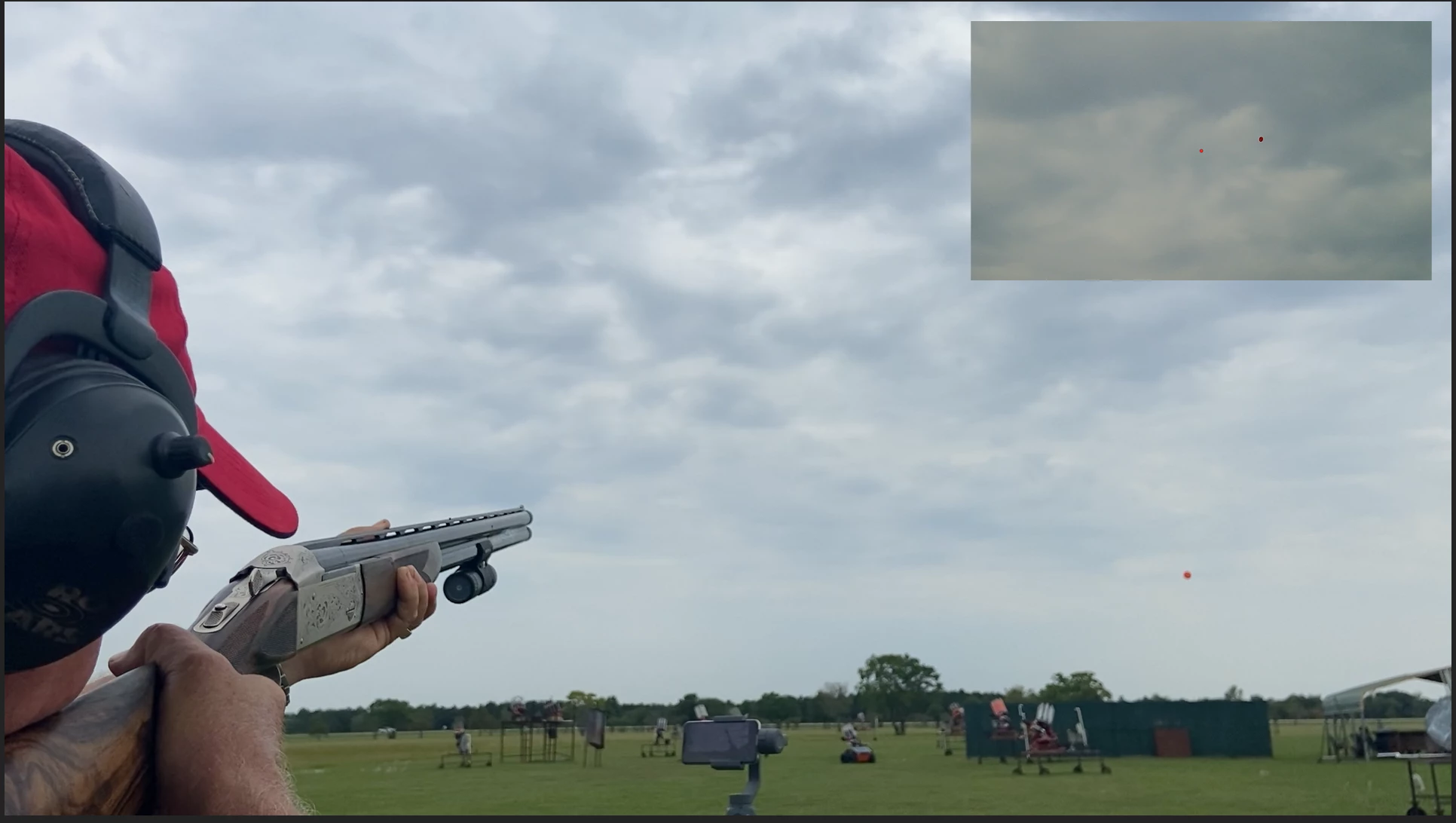
To me, it seemed logical to just sync up the "bang" audio of the gun from both clips as a starting point, and then tweak it from there. But because of the discrepancies in the frame rates, I can't seem to get them to sync up. Or perhaps there’s something else I’m missing
Bottom line: I want the red dot on the ShotKam clip to start moving at the exact second (or frame) that the barrel of the gun starts moving in the iPhone clip, and then move in sync with the gun barrel moving.
My conundrum, in other words, is what do I have to do to the iPhone clip to make it sync with the ShotKam clip (or vice versa)?
I've tried speeding up the ShotKam clip by 1/3 to match the speed of the iPhone clip, and tried slowing down the iPhone clip by 1/3 to match the Shotkam clip. No dice on either.
I understand that changing the speed/duration is different from changing frame rate, and I know how to change the frame rate of the clips/timeline. I just can't figure out how to make them sync!
I reached out to a professional and here was his response:
"So I've tried getting this right. I adjusted the 33 fps to 29.97 but it just doesn't want to align when you say pull. I can get the shot and clay disc breaking but the small screen seems like the disc shows in the screen before you say pull. I don't know that I can figure it out to align perfectly when you say pull without making it look like a jumpcut."
Searching around this forum, it looks like some people have suggested HandBrake to convert the frame rates, but I'm not sure which video I should change, and what I should do to it!
Truly appreciate any help you can offer.
 AdChoices