
System Compatibility Report *Confusion*
Here it's telling me the issue with the supposed driver
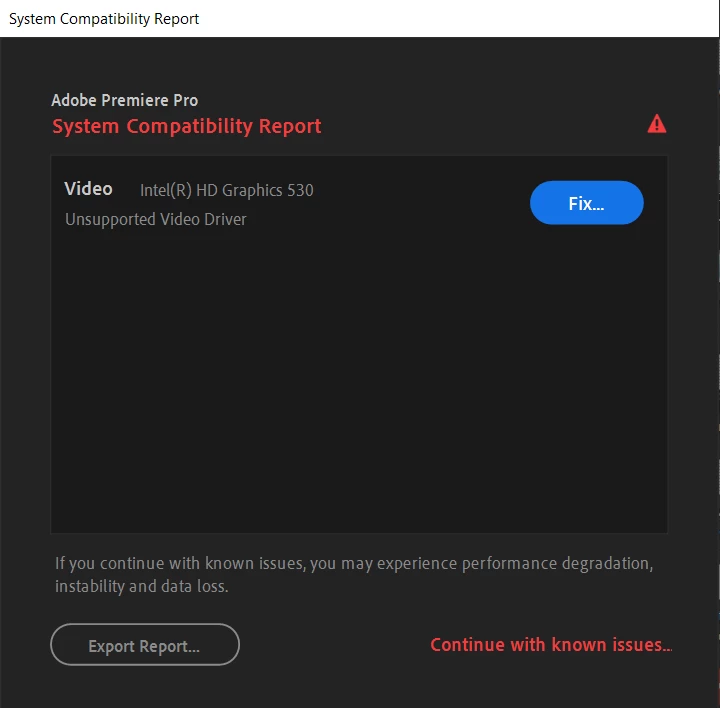
But when I look at the SystemCompatibilityReport (as shown below) it says my Intel(R) HD Graphics 530 Driver isn't the issue and that the issue is my NVIDIA GeForce GTX 1060 v.26.21.14.4575
System Components:
Operating System Windows v.10.0.18363.1
----------------------------------------------------------------------------
No conflicts to report.
Video Intel(R) HD Graphics 530 v.20.19.15.4549
----------------------------------------------------------------------------
1. The current version of your Intel display driver may cause performance and stability issues. It is strongly recommended that you update to driver version 100.6286 or later. Drivers are provided by Intel or your computer's manufacturer.
URL: https://helpx.adobe.com/premiere-pro/kb/drivers-video-win-intel.html
Video NVIDIA GeForce GTX 1060 v.26.21.14.4575
----------------------------------------------------------------------------
No conflicts to report.
Audio Intel(R) Display Audio v.8.20.0.950
----------------------------------------------------------------------------
No conflicts to report.
Audio NVIDIA Virtual Audio Device (Wave Extensible) (WDM) v.4.13.0.0
----------------------------------------------------------------------------
No conflicts to report.
Audio Realtek Audio v.6.0.8816.1
----------------------------------------------------------------------------
No conflicts to report.
Network Killer E2400 Gigabit Ethernet Controller v.9.0.0.49
----------------------------------------------------------------------------
No conflicts to report.
Network Killer Wireless-n/a/ac 1435 Wireless Network Adapter v.12.0.0.832
----------------------------------------------------------------------------
No conflicts to report.
Network Microsoft Kernel Debug Network Adapter v.10.0.18362.1
----------------------------------------------------------------------------
No conflicts to report.
Network Microsoft Wi-Fi Direct Virtual Adapter #3 v.10.0.18362.1
----------------------------------------------------------------------------
No conflicts to report.
Network Microsoft Wi-Fi Direct Virtual Adapter #4 v.10.0.18362.1
----------------------------------------------------------------------------
No conflicts to report.
Network WAN Miniport (IKEv2) v.10.0.18362.1
----------------------------------------------------------------------------
No conflicts to report.
Network WAN Miniport (IP) v.10.0.18362.1
----------------------------------------------------------------------------
No conflicts to report.
Network WAN Miniport (IPv6) v.10.0.18362.1
----------------------------------------------------------------------------
No conflicts to report.
Network WAN Miniport (L2TP) v.10.0.18362.1
----------------------------------------------------------------------------
No conflicts to report.
Network WAN Miniport (Network Monitor) v.10.0.18362.1
----------------------------------------------------------------------------
No conflicts to report.
Network WAN Miniport (PPPOE) v.10.0.18362.1
----------------------------------------------------------------------------
No conflicts to report.
Network WAN Miniport (PPTP) v.10.0.18362.1
----------------------------------------------------------------------------
No conflicts to report.
Network WAN Miniport (SSTP) v.10.0.18362.1
----------------------------------------------------------------------------
No conflicts to report.
____________________________________________________________________________
Debug database settings:
All settings default value
 AdChoices