
Text appears without caron's while copied to Premiere Pro
Hello! I have ran into a problem.
First of all I want to say that I have used this method before and never had any problems.
While creating subtitles for a video, I copy text from .doc(the same thing happens while copying from anywhere else) and paste it into text layer inside Premiere Pro. Never had any issues, but today I stumbled upon one. The copied text appears without "caron" on top.(for letters ā, ū, ž etc.). At first I thought it's a problem while copying, but later I realised that the Text layer actually contains the whole text with all the "caron's" on top, it just displays it without.(It can be manually added with no problem).

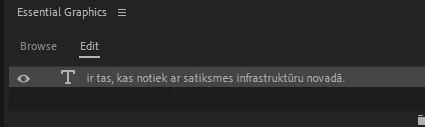
As you can see, U and A appears without sign at the top. (Ū and Ā)
Tried different fonts, different projects, restarting, reseting layouts and so on.
Anyone have a solution?
Rechanging every letter manually takes a lot of hours and is not a long term solution. As I said before, it was working fine just last week. Could the new update be the problem(updated 5 days ago)?
Thanks!
 AdChoices