
Inspiring
May 4, 2021
Answered

Text appears without caron's while copied to Premiere Pro

  • May 4, 2021
  • 3 replies
  • 4117 views

Hello! I have ran into a problem.
First of all I want to say that I have used this method before and never had any problems.

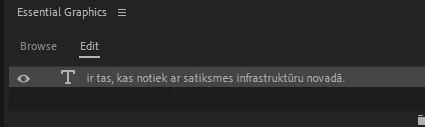
While creating subtitles for a video, I copy text from .doc(the same thing happens while copying from anywhere else) and paste it into text layer inside Premiere Pro. Never had any issues, but today I stumbled upon one. The copied text appears without "caron" on top.(for letters ā, ū, ž etc.). At first I thought it's a problem while copying, but later I realised that the Text layer actually contains the whole text with all the "caron's" on top, it just displays it without.(It can be manually added with no problem).

As you can see, U and A appears without sign at the top. (Ū and Ā)
Tried different fonts, different projects, restarting, reseting layouts and so on.
Anyone have a solution?
Rechanging every letter manually takes a lot of hours and is not a long term solution. As I said before, it was working fine just last week. Could the new update be the problem(updated 5 days ago)?

Thanks!

This topic has been closed for replies.
Correct answer JayLay

Guys, I found the problem.
It's not with the system or any Adobe products, but with the text itself.
Copying text doesn't make any difference(tried posting in WhatsApp and then friend copied it back to me, same thing), have to rewrite it anyway.

Try copying these texts into Premiere or AE -

Nolaidība un nekompetence ir teju vai noziedzīga.
Nolaidība un nekompetence ir teju vai noziedzīga..

The one with double ".." has been written by me, the one with one dot in the end is copied from the sent document.

Thank you all!

3 replies

JayLayAuthorCorrect answer
Inspiring
May 5, 2021

Guys, I found the problem.
It's not with the system or any Adobe products, but with the text itself.
Copying text doesn't make any difference(tried posting in WhatsApp and then friend copied it back to me, same thing), have to rewrite it anyway.

Try copying these texts into Premiere or AE -

Nolaidība un nekompetence ir teju vai noziedzīga.
Nolaidība un nekompetence ir teju vai noziedzīga..

The one with double ".." has been written by me, the one with one dot in the end is copied from the sent document.

Thank you all!

Stan Jones
Community Expert
Community Expert
May 5, 2021

Yes, I get your result when copying from here and pasting into PR captions. Fascinating!


The "bad" character appears to be a unicode issue and the use of nonspacing marks. The character is actually two elements. The first part is the letter "i", the second adds the accent. I don't understand it, but I think that is what it is. Paste into a text editor, and advance step by step with the arrow key. You can see that it takes two arrow presses to go over the problem character.


It appears to be a unicode 772, so I looked it up. Here's a related page:

https://www.compart.com/en/unicode/U+0304


The "good" character is ascii 299 instead of plain "i" 105.


I suspect there's a convertor that can "fix" the file you're working from.


Stan


JayLayAuthor
Inspiring
May 5, 2021

Thanks for the reply!
Already did all the rewriting, so it's done.


All this experience will be a big help in the future understanding characters and the encoding.


Cheers!

Participating Frequently
May 4, 2021

Could you let us know which font you are using? Some fonts don't support caron glyphs, so curious if maybe when you updated Premiere pro and pasted, it was a different font than what you used last week?


Stan and I did verify Arial, Comic Sans, Calibri, Adobe Clean, Garamond, Times New Roman and Minion Pro displayed carons.

JayLayAuthor
Inspiring
May 5, 2021

Thank you for the answer!
I tested different fonts. For this video(it's part of a series, carons did appear in previous ones) I used Gillroy-regular, but I have tried different ones, Times New Roman, Open sans, Roboto, etc. Always same result.
For creating subtitles I'm using just text layers placed in right place and time. Tried captions as well, same result - in Program Monitor it apears without carons, in Text panel with carons.
Also, as I said before - I can manually add carons to the text, so it appears right in Program monitor, so font is not an issue here, but the issue is with Program monitor, as the text appear right(with carons while copied from .doc) in any of the Text panels.
I will finish this video by adding carons manually, but it's not the solution for the future as it takes up a lot of extra time and possible spelling errors or missed carons.

Stan Jones
Community Expert
Community Expert
May 4, 2021

I am running 15.1. I assume that is the version you are running. (I first did the same tests in Beta 15.2.0.26 by mistake; same results.)


I copied/pasted  the bit of text you included -  "letters ā, ū, ž etc." It appears the same, with the sign at top, in the Text Panel, the Edit section of the Essential Graphics panel, and in the Program Monitor. It worked for both 608 closed captions and Subtitles, and for at least Arial and Comic Sans. I also put it in a Word document, and copy/pasted from there.


I like your troubleshooting: reset workspace, different fonts, copy methods, etc. There are other reports where there is a difference between the Text Panel and Program Monitor/EGP. For example, wingdings in the Text Panel.


I also tested both text engine settings in the caption track settings.


@Trent Happel Any reports of this?


Stan


JayLayAuthor
Inspiring
May 5, 2021

Thanks for the answer!
I'm running 15.1. and I assume that that is the problem as I did subtitles for video last week while it was still previous vesion.

I will try reinstalling Premiere Pro, will keep you updated.

JayLayAuthor
Inspiring
May 5, 2021

Reinstalled Premiere Pro, the problem still persists.


Tried pasting text in After Effects and the problem is also there. Only it appears with extra space after the letters with carons, yet, in Timeline it shows up correctly.


Could anyone help me understand why this is happening all of suddenly? Haven't made any changes to my system either, technical or program wise.